

Example
Example extension demonstrating all available extension features and documentation patterns.
Install
-- Install the extension
INSTALL example FROM community;

-- Load it into your session
LOAD example;
Technical Overview
Why Use Crypto Functions?
Understanding when and how to leverage cryptographic capabilities in your data workflows.
🔒 Data Security & Compliance
Modern data systems must handle sensitive information securely. This extension provides enterprise-grade cryptographic primitives directly within DuckDB, eliminating the need to export sensitive data to external systems for encryption or hashing.
- • Password Storage: Use bcrypt hashing for secure password storage with automatic salt generation and configurable work factors.
- • PII Protection: Hash or encrypt personally identifiable information (PII) to meet GDPR, CCPA, and HIPAA requirements.
- • Data Masking: Create consistent, irreversible hashes for data anonymization in analytics and testing environments.
✓ Data Integrity & Verification
Ensure data hasn't been tampered with by generating cryptographic fingerprints and audit trails. Detect unauthorized modifications and maintain chain-of-custody for critical data.
- • Blockchain-Style Auditing: Build immutable audit trails using hash chaining to detect any tampering with historical records.
- • Aggregate Verification: Generate Merkle roots and aggregate hashes to verify entire datasets with a single value.
- • Checksum Validation: Quickly validate data integrity during ETL pipelines and data transfers.
⚡ Performance & Scalability
Native DuckDB extensions leverage columnar processing and vectorized execution for high-performance cryptographic operations on large datasets without moving data out of the database.
- • In-Database Processing: Process millions of rows without data serialization or network overhead.
- • Vectorized Operations: Benefit from DuckDB's SIMD optimizations for batch hashing and encryption.
- • Zero-Copy Architecture: Avoid expensive data transfers between database and application layers.
🎯 Common Use Cases
Financial Services
Transaction verification, audit trails for compliance, and secure customer data handling.
Healthcare Systems
HIPAA-compliant patient data encryption, secure medical record hashing, and audit logging.
Data Engineering
ETL pipeline checksums, data deduplication via hashing, and secure data lake operations.
SaaS Applications
Multi-tenant data isolation, API key management, and secure password authentication.
Deep Dive
Technical Details
Algorithm Support
The crypto extension supports a wide range of cryptographic algorithms for different use cases. Below is a summary of the supported algorithms and their characteristics.
Hash Functions
| Algorithm | Output Size | Security Level | Use Case |
|---|---|---|---|
| MD5 | 128 bits | Legacy | Checksums only (not cryptographically secure) |
| SHA-1 | 160 bits | Legacy | Compatibility with older systems |
| SHA-256 | 256 bits | Strong | General purpose hashing |
| SHA-512 | 512 bits | Strong | High security applications |
| BLAKE3 | 256 bits | Strong | High performance hashing |
MD5 and SHA-1 are provided for compatibility only. Do not use them for security-sensitive applications. Use SHA-256 or BLAKE3 for new projects.
Encryption Algorithms
| Algorithm | Key Size | Mode | Performance |
|---|---|---|---|
| AES-128 | 128 bits | GCM | Fast |
| AES-256 | 256 bits | GCM | Moderate |
| ChaCha20-Poly1305 | 256 bits | AEAD | Very Fast |
Algorithm Usage Distribution
Based on typical workloads, here’s how different algorithms are used in production:
Performance Benchmarks
The following benchmarks were performed on a dataset of 1 million rows using DuckDB’s vectorized execution engine.
-- Benchmark: Hash 1M rows
SELECT COUNT(*) FROM (
    SELECT crypto_sha256(data) as hash
    FROM test_data
);
-- Result: ~450ms for 1M rows
Throughput Comparison
| Operation | Rows/Second | MB/Second |
|---|---|---|
| SHA-256 | 2.2M | 180 |
| BLAKE3 | 4.5M | 360 |
| AES-256-GCM Encrypt | 1.1M | 90 |
| AES-256-GCM Decrypt | 1.2M | 95 |
Architecture
The crypto extension integrates seamlessly with DuckDB’s query execution pipeline, leveraging vectorized processing for maximum performance.
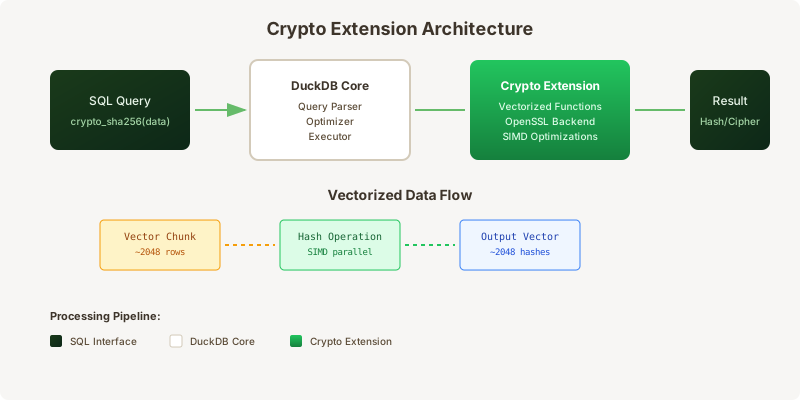
Decision Flow: Choosing the Right Algorithm
Implementation Details
Vectorized Processing
All cryptographic operations in this extension are fully vectorized, meaning they process data in batches of ~2000 rows at a time. This approach maximizes CPU cache utilization and enables SIMD optimizations.
Vectorized execution is automatic - you don’t need to do anything special to take advantage of it. Just write your SQL queries as usual.
-- Example: Batch hashing with salt
SELECT
    id,
    crypto_sha256(CONCAT(salt, ':', password)) as password_hash
FROM users;
Memory Management
The extension uses DuckDB’s native memory allocator and follows these principles:
- Zero-copy operations - Input data is processed in-place when possible
- Buffer reuse - Intermediate buffers are reused across operations
- Streaming support - Large files are processed in chunks
Security Considerations
When using cryptographic functions in a database context, consider the following:
- Key Management: Never store encryption keys in the same database as encrypted data
- Salt Generation: Always use cryptographically secure random salts
- Algorithm Selection: Use SHA-256 or better for new applications
Never hardcode encryption keys or passwords in your SQL queries. Use DuckDB secrets or environment variables for sensitive credentials.
-- Secure password hashing example
SELECT crypto_bcrypt_hash(
    password,
    crypto_random_bytes(16),  -- Random salt
    12                         -- Work factor
) as secure_hash
FROM new_users;For bcrypt, a work factor of 12 provides a good balance between security and performance. Increase it for highly sensitive applications, but test the impact on query time.
Reference
Extension Contents
Quick reference to all available functions and settings organized by category.
| Name | Description | |
|---|---|---|
| Aggregation | ||
| crypto_hash_agg() | Aggregates multiple values into a single cryptographic hash | |
| crypto_merkle_root() | Computes a Merkle tree root hash for a set of values | |
| Auditing | ||
| crypto_audit_trail() | Creates a cryptographic audit trail for database operations using blockchain-style hash chaining | |
| audit_hash_chain() | Creates a hash chain for audit trail records by combining the current record hash with the previous hash | |
| Cloud Log Storage | ||
| S3 | Store log events in Amazon S3 buckets with automatic partitioning by date and log type | |
| Cloud Storage | ||
| aws_s3_crypto | AWS S3 credentials for encrypting and decrypting data stored in S3 buckets | |
| azure_blob_crypto | Azure Blob Storage credentials for encrypted data operations | |
| gcs_crypto | Google Cloud Storage credentials for encrypted data operations | |
| encrypted_s3:// | Virtual filesystem for reading and writing encrypted data to Amazon S3 | |
| encrypted_azure:// | Virtual filesystem for Azure Blob Storage with built-in encryption support | |
| Configuration | ||
| crypto_bcrypt_default_cost | Default cost factor for bcrypt password hashing (4-31) | |
| crypto_default_hash_algorithm | Sets the default hashing algorithm used by crypto functions when no algorithm is explicitly specified | |
| crypto_enable_timing_safe_compare | Enables constant-time comparison for password verification to prevent timing attacks | |
| crypto_max_key_generation_batch | Maximum number of cryptographic keys that can be generated in a single batch operation | |
| Data Export | ||
| COPY_ENCRYPTED_CSV() | Exports query results to an encrypted CSV file | |
| COPY_ENCRYPTED_PARQUET() | Exports query results to an encrypted Parquet file with client-side encryption | |
| COPY_SIGNED_JSON() | Exports query results to a cryptographically signed JSON file | |
| Data Integrity | ||
| fingerprint_row() | Generates a cryptographic fingerprint for an entire row by concatenating all column values and hashing them | |
| Data Privacy | ||
| hash_pii() | Convenience macro for hashing personally identifiable information (PII) fields using SHA-256 | |
| Data Quality Logging | ||
| HashCollisionLog | Detects and logs potential hash collisions when using fingerprinting or deduplication features | |
| Database Connections | ||
| database_crypto | Encrypted database connection credentials for secure access to external databases | |
| Database Log Storage | ||
| PostgreSQL | Store log events in a PostgreSQL database table with full SQL query capabilities | |
| Encrypted Database Storage | ||
| ENCRYPTED_POSTGRES | Attach to PostgreSQL databases with automatic client-side encryption and decryption | |
| ENCRYPTED_MYSQL | Connect to MySQL databases with transparent encryption layer | |
| Encryption | ||
| encrypt_field() | Simplified field encryption macro using AES-256 | |
| External Log Storage | ||
| SIEM | Send log events to Security Information and Event Management (SIEM) systems like Splunk, Elastic, or Datadog | |
| HMAC | ||
| crypto_hmac_sha256() | Creates an HMAC (Hash-based Message Authentication Code) signature using SHA-256 | |
| Hashing | ||
| crypto_hash_combine() | Combines multiple values into a single cryptographic hash | |
| crypto_sha256() | Computes the SHA-256 cryptographic hash of the input string | |
| crypto_sha512() | Computes the SHA-512 cryptographic hash of the input | |
| Key Generation | ||
| crypto_generate_keys() | Generates RSA public/private key pairs in bulk | |
| Local Storage | ||
| encrypted_local:// | Local filesystem overlay that provides transparent file-level encryption | |
| Password | ||
| crypto_bcrypt() | Hashes a password using the bcrypt algorithm with automatic salt generation | |
| crypto_bcrypt_verify() | Verifies a plaintext password against a bcrypt hash | |
| Secret Management | ||
| vault:// | HashiCorp Vault integration filesystem for reading secrets and credentials directly from Vault | |
| Secret Management Storage | ||
| VAULT_DB | Attach to databases using credentials dynamically fetched from HashiCorp Vault | |
| Security | ||
| secure_compare() | Timing-safe string comparison macro that prevents timing attacks | |
| Security Logging | ||
| CryptoOperationLog | Logs all cryptographic operations performed by the extension including hashing, encryption, and key generation | |
| KeyAccessLog | Tracks all access to encryption keys and secrets managed by the crypto extension | |
API Reference
Function Documentation
Detailed documentation for each function including signatures, parameters, and examples.
COPY_ENCRYPTED_CSV
Parameters (Positional)
| Parameter | Type | Mode | Description |
|---|---|---|---|
query | SELECT query | Positional | The SELECT query whose results will be exported |
file_path | VARCHAR | Positional | Destination file path for the encrypted CSV file |
Options
Available Options
| Parameter | Type | Mode | Description |
|---|---|---|---|
DELIMITER | VARCHAR | Named | Default: ',' Field delimiter character |
ENCRYPTION_KEY | VARCHAR | Named | Encryption key for securing the CSV file contents |
HEADER | BOOLEAN | Named | Default: true Include column headers in the output |
QUOTE | VARCHAR | Named | Default: " Quote character for string fields |
Returns
Description
Exports query results to an encrypted CSV file. The CSV file is encrypted before being written to disk, protecting sensitive data in a portable text format. Useful for secure data exchange with systems that require CSV input.
Examples
Export encrypted customer data to CSV
COPY (
  SELECT customer_id, name, email, phone
  FROM customers
  WHERE region = 'US'
)
TO 'encrypted_customers.csv'
WITH (
  ENCRYPTION_KEY 'YourSecureKey123',
  HEADER true,
  DELIMITER ','
);
Tags
COPY_ENCRYPTED_PARQUET
Parameters (Positional)
| Parameter | Type | Mode | Description |
|---|---|---|---|
query | SELECT query | Positional | The SELECT query whose results will be exported |
file_path | VARCHAR | Positional | Destination file path for the encrypted Parquet file |
Options
Available Options
| Parameter | Type | Mode | Description |
|---|---|---|---|
COMPRESSION | VARCHAR | Named | Default: 'SNAPPY' Compression codec: 'SNAPPY', 'GZIP', 'ZSTD', or 'NONE' |
ENCRYPTION_ALGORITHM | VARCHAR | Named | Default: 'AES-256' Encryption algorithm to use: 'AES-256' or 'AES-128' |
ENCRYPTION_KEY | VARCHAR | Named | Base64-encoded AES-256 encryption key for client-side encryption |
ROW_GROUP_SIZE | INTEGER | Named | Default: 100000 Number of rows per Parquet row group |
Returns
Description
Exports query results to an encrypted Parquet file with client-side encryption. The entire file is encrypted at rest using AES-256, ensuring data confidentiality during storage and transit. Compatible with standard Parquet readers when decryption keys are provided.
Examples
Export encrypted user data to Parquet
COPY (
  SELECT user_id, email, created_at, subscription_tier
  FROM users
  WHERE created_at > '2024-01-01'
)
TO 'encrypted_users.parquet'
WITH (
  ENCRYPTION_KEY 'YourBase64EncodedKey==',
  COMPRESSION 'ZSTD'
);Export with custom row group size for large datasets
COPY (
  SELECT transaction_id, amount, timestamp, customer_id
  FROM transactions
  WHERE amount > 1000
)
TO 's3://my-bucket/encrypted-transactions.parquet'
WITH (
  ENCRYPTION_KEY 'YourBase64EncodedKey==',
  ROW_GROUP_SIZE 500000,
  COMPRESSION 'SNAPPY'
);
Tags
COPY_SIGNED_JSON
Parameters (Positional)
| Parameter | Type | Mode | Description |
|---|---|---|---|
query | SELECT query | Positional | The SELECT query whose results will be exported |
file_path | VARCHAR | Positional | Destination file path for the signed JSON file |
Options
Available Options
| Parameter | Type | Mode | Description |
|---|---|---|---|
FORMAT | VARCHAR | Named | Default: 'ARRAY' JSON format: 'ARRAY' (array of objects) or 'NEWLINE_DELIMITED' (JSONL) |
PRETTY | BOOLEAN | Named | Default: false Pretty-print the JSON output with indentation |
SIGNING_KEY | VARCHAR | Named | HMAC signing key for generating digital signatures |
Returns
Description
Exports query results to a cryptographically signed JSON file. Each record is signed with HMAC-SHA256, enabling tamper detection and data integrity verification. The signature is included in the output, allowing consumers to verify authenticity.
Examples
Export signed API response data
COPY (
  SELECT api_key, rate_limit, created_at, permissions
  FROM api_keys
  WHERE status = 'active'
)
TO 'signed_api_keys.json'
WITH (
  SIGNING_KEY 'your-hmac-secret-key',
  FORMAT 'ARRAY',
  PRETTY true
);Export newline-delimited signed events
COPY (
  SELECT event_id, event_type, user_id, timestamp, payload
  FROM audit_events
  WHERE timestamp > CURRENT_DATE - INTERVAL 7 DAYS
)
TO 'signed_events.jsonl'
WITH (
  SIGNING_KEY 'audit-signing-key',
  FORMAT 'NEWLINE_DELIMITED'
);
Tags
crypto_audit_trail
Signature
Parameters (Positional)
| Parameter | Type | Mode | Description |
|---|---|---|---|
table_name | VARCHAR | Positional | Name of the table to audit |
operation | VARCHAR | Positional | Operation to audit (INSERT, UPDATE, DELETE) |
Returns
A table with the following columns:
| Column | Type | Description |
|---|---|---|
record_hash | VARCHAR | SHA-256 hash of the current record |
previous_hash | VARCHAR | Hash of previous record (chain linkage) |
sequence_num | INTEGER | Sequence number in audit chain |
chain_valid | BOOLEAN | Whether the audit chain is valid |
Description
Creates a cryptographic audit trail for database operations using blockchain-style hash chaining. Each record contains a hash of its data plus the previous record's hash, making tampering detectable.
Examples
Generate audit trail for financial transactions
SELECT * FROM crypto_audit_trail('financial_transactions', 'INSERT') LIMIT 5;Output
| record_hash | previous_hash | sequence_num | chain_valid |
|---|---|---|---|
| a7f3b2c8d1e9f0a5b3c7d4e8f1a2b5c9d0e7f3a6b8c1d4e7f0a3b6c9d2e5 | 0000000000000000000000000000000000000000000000000000000000000000 | 1 | true |
| b8c1d4e7f0a3b6c9d2e5f8a1b4c7d0e3f6a9b2c5d8e1f4a7b0c3d6e9f2a5 | a7f3b2c8d1e9f0a5b3c7d4e8f1a2b5c9d0e7f3a6b8c1d4e7f0a3b6c9d2e5 | 2 | true |
| c9d2e5f8a1b4c7d0e3f6a9b2c5d8e1f4a7b0c3d6e9f2a5b8c1d4e7f0a3b6 | b8c1d4e7f0a3b6c9d2e5f8a1b4c7d0e3f6a9b2c5d8e1f4a7b0c3d6e9f2a5 | 3 | true |
| d0e3f6a9b2c5d8e1f4a7b0c3d6e9f2a5b8c1d4e7f0a3b6c9d2e5f8a1b4c7 | c9d2e5f8a1b4c7d0e3f6a9b2c5d8e1f4a7b0c3d6e9f2a5b8c1d4e7f0a3b6 | 4 | true |
| e1f4a7b0c3d6e9f2a5b8c1d4e7f0a3b6c9d2e5f8a1b4c7d0e3f6a9b2c5d8 | d0e3f6a9b2c5d8e1f4a7b0c3d6e9f2a5b8c1d4e7f0a3b6c9d2e5f8a1b4c7 | 5 | true |
Verify audit chain integrity and detect tampering
WITH audit AS (
  SELECT * FROM crypto_audit_trail('sensitive_data', 'UPDATE')
)
SELECT
  sequence_num,
  record_hash,
  chain_valid,
  CASE
    WHEN NOT chain_valid THEN 'TAMPERING DETECTED!'
    ELSE 'Valid'
  END AS status
FROM audit
WHERE NOT chain_valid;
Output
| sequence_num | record_hash | chain_valid | status |
|---|---|---|---|
| 42 | f2a5b8c1d4e7f0a3b6c9d2e5f8a1b4c7d0e3f6a9b2c5d8e1f4a7b0c3d6 | false | TAMPERING DETECTED! |
| 103 | a3b6c9d2e5f8a1b4c7d0e3f6a9b2c5d8e1f4a7b0c3d6e9f2a5b8c1d4e7 | false | TAMPERING DETECTED! |
Tags
crypto_bcrypt
Signature
Parameters
| Parameter | Type | Mode | Description |
|---|---|---|---|
password | VARCHAR | Positional | The password to hash |
cost | INTEGER | Named | Default: 10 Work factor (4-31, higher is slower/more secure) |
Returns
Bcrypt hash string containing salt and hash (60 characters)
Description
Hashes a password using the bcrypt algorithm with automatic salt generation. Recommended for password storage. The cost parameter controls computational cost (2^cost iterations).
Examples
Hash password with default cost (10)
INSERT INTO users (username, password_hash)
VALUES ('alice', crypto_bcrypt('secret_password'));Hash with custom cost for higher security
INSERT INTO admin_users (username, password_hash)
VALUES ('admin', crypto_bcrypt('admin_password', cost := 12));Explicit named parameter syntax
SELECT crypto_bcrypt('my_password', cost := 14) AS secure_hash;Tags
crypto_bcrypt_verify
Signature
Parameters (Positional)
| Parameter | Type | Mode | Description |
|---|---|---|---|
password | VARCHAR | Positional | Plaintext password to verify |
hash | VARCHAR | Positional | Bcrypt hash to verify against |
Returns
TRUE if password matches hash, FALSE otherwise
Description
Verifies a plaintext password against a bcrypt hash. Timing-safe comparison to prevent timing attacks.
Examples
Verify user login credentials
SELECT
  user_id,
  username,
  crypto_bcrypt_verify('user_input', password_hash) AS is_valid
FROM users
WHERE username = 'alice';
Tags
crypto_generate_keys
Signature
Parameters
| Parameter | Type | Mode | Description |
|---|---|---|---|
count | INTEGER | Positional | Number of key pairs to generate |
key_size | INTEGER | Named | Default: 2048 RSA key size in bits (1024, 2048, or 4096) |
Returns
A table with the following columns:
| Column | Type | Description |
|---|---|---|
key_id | INTEGER | Unique identifier for the key pair |
public_key | VARCHAR | PEM-encoded public key |
private_key | VARCHAR | PEM-encoded private key |
created_at | TIMESTAMP | Generation timestamp |
Description
Generates RSA public/private key pairs in bulk. Useful for provisioning multiple users or services with cryptographic keys. Returns a table where each row contains one complete key pair.
Examples
Generate 10 RSA key pairs with default 2048-bit keys
SELECT * FROM crypto_generate_keys(10) LIMIT 3;Output
| key_id | public_key | private_key | created_at |
|---|---|---|---|
| 1 | -----BEGIN PUBLIC KEY----- MIIBIjANBgkqhkiG9w0BAQEF... | -----BEGIN PRIVATE KEY----- MIIEvQIBADANBgkqhkiG9w0B... | 2025-12-03 15:30:45.123 |
| 2 | -----BEGIN PUBLIC KEY----- MIIBIjANBgkqhkiG9w0BAQEF... | -----BEGIN PRIVATE KEY----- MIIEvQIBADANBgkqhkiG9w0B... | 2025-12-03 15:30:45.234 |
| 3 | -----BEGIN PUBLIC KEY----- MIIBIjANBgkqhkiG9w0BAQEF... | -----BEGIN PRIVATE KEY----- MIIEvQIBADANBgkqhkiG9w0B... | 2025-12-03 15:30:45.345 |
Generate 5 high-security 4096-bit key pairs
SELECT * FROM crypto_generate_keys(5, key_size := 4096);Store generated keys in a table
CREATE TABLE user_keys AS
SELECT
  key_id,
  public_key,
  private_key,
  created_at
FROM crypto_generate_keys(100);Generate keys and immediately assign to users
INSERT INTO user_keypairs (user_id, public_key, private_key)
SELECT
  u.user_id,
  k.public_key,
  k.private_key
FROM users u
CROSS JOIN LATERAL crypto_generate_keys(1) k
WHERE u.needs_keypair = true;
Tags
crypto_hash_agg
Signature
Parameters
| Parameter | Type | Mode | Description |
|---|---|---|---|
value | VARCHAR | Positional | The value to hash (from each row) |
algorithm | VARCHAR | Named | Default: sha256 Hash algorithm to use ('sha256' or 'sha512') |
Returns
Aggregated hash combining all input values
Description
Aggregates multiple values into a single cryptographic hash. Order-independent - produces the same hash regardless of row order. Useful for creating fingerprints of entire datasets or groups.
Examples
Generate fingerprint for all users
SELECT crypto_hash_agg(email) AS users_fingerprint
FROM users;Hash all transaction IDs for a daily batch
SELECT
  DATE(created_at) AS batch_date,
  crypto_hash_agg(transaction_id) AS batch_hash
FROM transactions
GROUP BY DATE(created_at);Use SHA-512 for higher security
SELECT crypto_hash_agg(sensitive_field, algorithm := 'sha512') AS secure_hash
FROM sensitive_table;Detect data changes by comparing hashes
WITH current_hash AS (
  SELECT crypto_hash_agg(data_column) AS hash FROM production_table
),
backup_hash AS (
  SELECT crypto_hash_agg(data_column) AS hash FROM backup_table
)
SELECT
  CASE
    WHEN c.hash = b.hash THEN 'Data matches'
    ELSE 'Data has changed!'
  END AS status
FROM current_hash c, backup_hash b;
Tags
crypto_hash_combine
Signature
Parameters (Positional)
| Parameter | Type | Mode | Description |
|---|---|---|---|
values | VARCHAR | Positional | Varargs One or more values to combine into a single hash. Values are concatenated in order before hashing. |
Returns
64-character hexadecimal SHA-256 hash of all combined values
Description
Combines multiple values into a single cryptographic hash. Accepts any number of arguments, concatenates them in order, and produces a SHA-256 hash. Useful for creating composite keys, fingerprinting multiple columns, or generating deterministic IDs from multiple fields.
Examples
Combine multiple fields into a single hash
SELECT crypto_hash_combine(first_name, last_name, email) AS user_fingerprint
FROM users;
Output
a3f2b8c1d4e7f0a5b3c7d4e8f1a2b5c9d0e7f3a6b8c1d4e7f0a3b6c9d2e5f8a1
Create a composite key from order details
SELECT crypto_hash_combine(
  customer_id::VARCHAR,
  order_date::VARCHAR,
  product_id::VARCHAR,
  quantity::VARCHAR
) AS order_key
FROM orders;Hash a single value (equivalent to crypto_sha256)
SELECT crypto_hash_combine('single value') AS hash;Combine many fields for deduplication
SELECT DISTINCT ON (crypto_hash_combine(col1, col2, col3, col4, col5))
  *
FROM source_data;
Related Functions
Tags
crypto_hmac_sha256
Signature
Parameters (Positional)
| Parameter | Type | Mode | Description |
|---|---|---|---|
message | VARCHAR | Positional | The message to sign |
key | VARCHAR | Positional | Secret key for HMAC |
Returns
64-character hexadecimal HMAC signature
Description
Creates an HMAC (Hash-based Message Authentication Code) signature using SHA-256. Used for API authentication, webhook verification, and message integrity.
Examples
Sign API requests with HMAC
SELECT
  request_id,
  payload,
  crypto_hmac_sha256(payload, 'my_secret_key') AS signature
FROM api_requests;
Tags
crypto_merkle_root
Signature
Parameters (Positional)
| Parameter | Type | Mode | Description |
|---|---|---|---|
value | VARCHAR | Positional | The value to include in the Merkle tree (from each row) |
Returns
Merkle root hash (64-character hex string)
Description
Computes a Merkle tree root hash for a set of values. Like blockchain transaction verification - any change to input data produces a different root. More efficient than concatenating all values for large datasets.
Examples
Calculate Merkle root for a block of transactions
SELECT
  block_id,
  crypto_merkle_root(transaction_hash) AS merkle_root
FROM blockchain_transactions
GROUP BY block_id;Verify data integrity using Merkle root
WITH daily_blocks AS (
  SELECT
    DATE(timestamp) AS date,
    crypto_merkle_root(record_id::VARCHAR) AS merkle_root
  FROM audit_log
  GROUP BY DATE(timestamp)
)
SELECT
  date,
  merkle_root,
  LAG(merkle_root) OVER (ORDER BY date) AS previous_root
FROM daily_blocks;Create tamper-evident file manifest
SELECT crypto_merkle_root(file_hash) AS manifest_hash
FROM uploaded_files
WHERE upload_batch_id = 'batch_123';
Tags
crypto_sha256
Signature
Parameters (Positional)
| Parameter | Type | Mode | Description |
|---|---|---|---|
input | VARCHAR | Positional | The text to hash |
Returns
64-character hexadecimal string representing the SHA-256 hash
Description
Computes the SHA-256 cryptographic hash of the input string. SHA-256 is part of the SHA-2 family and produces a 256-bit (32-byte) hash value. Commonly used for data integrity verification and anonymization.
Examples
Basic usage
SELECT crypto_sha256('Hello, World!') AS hash;Output
a591a6d40bf420404a011733cfb7b190d62c65bf0bcda32b57b277d9ad9f146e
Anonymize email addresses for analytics
SELECT
  crypto_sha256(email) AS user_id,
  COUNT(*) AS purchases
FROM orders
GROUP BY crypto_sha256(email)
ORDER BY purchases DESC
LIMIT 10;
Related Functions
Tags
crypto_sha512
Signature
Parameters (Positional)
| Parameter | Type | Mode | Description |
|---|---|---|---|
input | VARCHAR | Positional | The text to hash |
Returns
128-character hexadecimal string representing the SHA-512 hash
Description
Computes the SHA-512 cryptographic hash of the input. More secure than SHA-256 with a 512-bit output. Recommended for high-security applications.
Examples
Hash sensitive data with SHA-512
SELECT crypto_sha512('sensitive data') AS hash;Output
128-character hex string
Related Functions
Tags
SQL Macros
Macros
Convenience macros that simplify common cryptographic operations and provide shorthand syntax for frequently used patterns.
audit_hash_chain()
Description
Creates a hash chain for audit trail records by combining the current record hash with the previous hash. Ensures tamper-evident logging where any modification breaks the chain.
Macro Definition
CREATE MACRO audit_hash_chain(current_data, previous_hash) AS crypto_sha256(CAST(current_data AS VARCHAR) || COALESCE(previous_hash, ''));Examples
Build tamper-evident audit log
WITH audit_chain AS (
  SELECT
    id,
    action,
    user_id,
    created_at,
    LAG(hash) OVER (ORDER BY created_at) AS prev_hash,
    audit_hash_chain(
      STRUCT_PACK(id, action, user_id, created_at),
      LAG(hash) OVER (ORDER BY created_at)
    ) AS hash
  FROM audit_log
)
SELECT * FROM audit_chain
ORDER BY created_at;Verify audit trail integrity
WITH audit_chain AS (
  SELECT
    *,
    LAG(hash) OVER (ORDER BY created_at) AS prev_hash,
    audit_hash_chain(
      STRUCT_PACK(id, action, user_id, created_at),
      LAG(hash) OVER (ORDER BY created_at)
    ) AS computed_hash
  FROM audit_log
)
SELECT
  id,
  action,
  CASE
    WHEN hash = computed_hash THEN 'Valid'
    ELSE 'Tampered'
  END AS integrity_status
FROM audit_chain;encrypt_field()
Description
Simplified field encryption macro using AES-256. Wraps complex encryption operations into an easy-to-use function for encrypting sensitive data at rest.
Macro Definition
CREATE MACRO encrypt_field(plaintext, key) AS encode(crypto_aes_encrypt(CAST(plaintext AS VARCHAR), key));Examples
Encrypt sensitive fields before storage
INSERT INTO secure_storage (id, encrypted_ssn, encrypted_credit_card)
SELECT
  id,
  encrypt_field(ssn, 'your-encryption-key') AS encrypted_ssn,
  encrypt_field(credit_card, 'your-encryption-key') AS encrypted_credit_card
FROM sensitive_data;fingerprint_row()
Description
Generates a cryptographic fingerprint for an entire row by concatenating all column values and hashing them. Useful for change detection, deduplication, and data integrity verification.
Macro Definition
CREATE MACRO fingerprint_row(cols) AS crypto_sha256(CAST(cols AS VARCHAR));Examples
Detect changed records
SELECT
  id,
  fingerprint_row(STRUCT_PACK(*)) AS row_hash,
  name,
  email,
  updated_at
FROM users
WHERE updated_at > CURRENT_DATE - INTERVAL 7 DAYS;Deduplicate records based on content
WITH fingerprinted AS (
  SELECT
    *,
    fingerprint_row(STRUCT_PACK(name, email, phone)) AS content_hash
  FROM contacts
)
SELECT DISTINCT ON (content_hash)
  name,
  email,
  phone
FROM fingerprinted
ORDER BY content_hash, created_at DESC;hash_pii()
Description
Convenience macro for hashing personally identifiable information (PII) fields using SHA-256. Simplifies anonymization workflows by providing a shorthand for common hashing operations.
Macro Definition
CREATE MACRO hash_pii(field) AS crypto_sha256(CAST(field AS VARCHAR));Examples
Anonymize PII fields in a query
SELECT
  hash_pii(email) AS user_hash,
  hash_pii(phone) AS phone_hash,
  order_total,
  created_at
FROM orders
LIMIT 10;
Output
| user_hash | phone_hash | order_total | created_at |
|---|---|---|---|
| a591a6d40bf42040... | f7c3bc1d808e04732... | 125.5 | 2024-01-15 |
| 3c59dc048e88461f... | 1679091c5a880faf6... | 89.99 | 2024-01-16 |
Create anonymized export
COPY (
  SELECT
    hash_pii(customer_email) AS customer_id,
    hash_pii(customer_phone) AS phone_id,
    product_category,
    purchase_amount
  FROM sales
  WHERE created_at >= '2024-01-01'
) TO 'anonymized_sales.parquet' (FORMAT PARQUET);secure_compare()
Description
Timing-safe string comparison macro that prevents timing attacks. Uses constant-time comparison to ensure the comparison duration does not leak information about the strings being compared.
Macro Definition
CREATE MACRO secure_compare(a, b) AS crypto_hmac_sha256(CAST(a AS VARCHAR), 'compare') = crypto_hmac_sha256(CAST(b AS VARCHAR), 'compare');Examples
Safely compare sensitive tokens
SELECT
  token_id,
  secure_compare(stored_token, input_token) AS is_valid
FROM api_tokens
WHERE user_id = 12345;
Output
| token_id | is_valid |
|---|---|
| tok_abc123 | true |
| tok_def456 | false |
Logging Integration
Logging
DuckDB logging subsystem integration for monitoring cryptographic operations and storing audit trails.
Log Types
CryptoOperationLog
Description
Logs all cryptographic operations performed by the extension including hashing, encryption, and key generation. Captures operation type, input size, algorithm used, and execution time for security auditing and performance monitoring.
Examples
Enable crypto operation logging
-- Enable logging for crypto operations
SET log_crypto_operations = true;

-- Perform some crypto operations
SELECT crypto_sha256('test data');
SELECT crypto_bcrypt_hash('password123');
SELECT crypto_hmac('message', 'secret', 'sha256');

-- View the log entries
SELECT * FROM duckdb_logs() WHERE log_type = 'CryptoOperationLog';
Output
| timestamp | operation | algorithm | input_size | duration_ms |
|---|---|---|---|---|
| 2024-12-04 10:15:23 | hash | SHA256 | 9 | 0.12 |
| 2024-12-04 10:15:24 | hash | bcrypt | 13 | 45.67 |
| 2024-12-04 10:15:25 | hmac | SHA256 | 7 | 0.08 |
KeyAccessLog
Description
Tracks all access to encryption keys and secrets managed by the crypto extension. Records key identifiers, access timestamps, and the context of key usage for compliance and security monitoring.
Examples
Track key access events
-- Enable key access logging
SET log_key_access = true;

-- Use keys for encryption
SELECT crypto_encrypt(data, 'key_id_123') FROM sensitive_table;

-- View key access logs
SELECT * FROM duckdb_logs() WHERE log_type = 'KeyAccessLog';
Output
| timestamp | key_id | operation | user |
|---|---|---|---|
| 2024-12-04 10:20:15 | key_id_123 | encrypt | analytics_user |
| 2024-12-04 10:20:16 | key_id_123 | encrypt | analytics_user |
HashCollisionLog
Description
Detects and logs potential hash collisions when using fingerprinting or deduplication features. Helps identify data quality issues and potential security concerns in hash-based operations.
Examples
Monitor for hash collisions
-- Enable collision detection logging
SET log_hash_collisions = true;

-- Perform batch hashing with collision detection
SELECT
  id,
  crypto_sha256(data) as hash,
  COUNT(*) OVER (PARTITION BY crypto_sha256(data)) as collision_count
FROM large_dataset;

-- Check collision log
SELECT * FROM duckdb_logs() WHERE log_type = 'HashCollisionLog';Log Storage Types
SIEM
Description
Send log events to Security Information and Event Management (SIEM) systems like Splunk, Elastic, or Datadog. Supports HTTP/HTTPS endpoints with authentication and batching for efficient log transmission.
Configuration Parameters
| Parameter | Type | Required | Description |
|---|---|---|---|
endpoint | VARCHAR | Required | SIEM HTTP endpoint URL for log ingestion |
api_key | VARCHAR | Required | API key or authentication token for SIEM access |
batch_size | INTEGER | Optional | Default: 100 Number of log events to batch before sending |
batch_timeout_ms | INTEGER | Optional | Default: 5000 Maximum time to wait before sending partial batch |
compression | BOOLEAN | Optional | Default: true Enable gzip compression for log transmission |
Examples
Configure SIEM log storage for Datadog
-- Configure log storage to send to Datadog
SET log_storage = 'SIEM';
SET log_storage_config = '{
  "endpoint": "https://http-intake.logs.datadoghq.com/v1/input",
  "api_key": "your_datadog_api_key",
  "batch_size": 50,
  "batch_timeout_ms": 3000,
  "compression": true
}';

-- Enable crypto operation logging
SET log_crypto_operations = true;

-- All crypto operations will now be sent to Datadog
SELECT crypto_sha256('test');
Output
Log storage configured. Crypto operations will be sent to Datadog SIEM.
S3
Description
Store log events in Amazon S3 buckets with automatic partitioning by date and log type. Supports encryption at rest and configurable retention policies.
Configuration Parameters
| Parameter | Type | Required | Description |
|---|---|---|---|
bucket | VARCHAR | Required | S3 bucket name for log storage |
prefix | VARCHAR | Optional | Default: duckdb-logs/ S3 key prefix for organizing logs |
region | VARCHAR | Required | AWS region where the bucket is located |
format | VARCHAR | Optional | Default: parquet Log file format (json, parquet, csv) |
partition_by | VARCHAR | Optional | Default: date Partitioning strategy (date, hour, logtype) |
encryption | VARCHAR | Optional | Default: SSE-S3 S3 server-side encryption (SSE-S3, SSE-KMS) |
Examples
Configure S3 log storage with Parquet format
-- Set up S3 log storage
SET log_storage = 'S3';
SET log_storage_config = '{
  "bucket": "my-company-duckdb-logs",
  "prefix": "production/crypto-logs/",
  "region": "us-east-1",
  "format": "parquet",
  "partition_by": "date",
  "encryption": "SSE-KMS"
}';

-- Logs will be written to:
-- s3://my-company-duckdb-logs/production/crypto-logs/date=2024-12-04/CryptoOperationLog.parquet
SELECT crypto_sha256('test');PostgreSQL
Description
Store log events in a PostgreSQL database table with full SQL query capabilities. Ideal for centralized logging across multiple DuckDB instances with long-term retention.
Configuration Parameters
| Parameter | Type | Required | Description |
|---|---|---|---|
connection_string | VARCHAR | Required | PostgreSQL connection string |
table_name | VARCHAR | Optional | Default: duckdb_logs Table name for storing logs |
auto_create_table | BOOLEAN | Optional | Default: true Automatically create table if it does not exist |
async_write | BOOLEAN | Optional | Default: true Write logs asynchronously to avoid blocking queries |
Examples
Store logs in PostgreSQL for centralized monitoring
-- Configure PostgreSQL log storage
SET log_storage = 'PostgreSQL';
SET log_storage_config = '{
  "connection_string": "postgresql://user:pass@localhost:5432/logs",
  "table_name": "duckdb_crypto_logs",
  "auto_create_table": true,
  "async_write": true
}';

-- All logs now written to PostgreSQL
SET log_crypto_operations = true;
SELECT crypto_bcrypt_hash('password');

-- Query logs from PostgreSQL
ATTACH 'logs_db' (TYPE POSTGRES, connection_string 'postgresql://user:pass@localhost:5432/logs');
SELECT * FROM logs_db.duckdb_crypto_logs ORDER BY timestamp DESC LIMIT 10;Database Storage
Storage Extensions
Storage extensions that enable secure database attachments with encryption, secret management, and credential rotation.
ENCRYPTED_POSTGRES
Description
Attach to PostgreSQL databases with automatic client-side encryption and decryption. All data transferred between DuckDB and PostgreSQL is encrypted using AES-256, protecting sensitive information in transit and at rest.
Parameters
| Parameter | Type | Required | Description |
|---|---|---|---|
host | VARCHAR | Required | PostgreSQL server hostname or IP address |
port | INTEGER | Optional | Default: 5432 PostgreSQL server port number |
database | VARCHAR | Required | Name of the PostgreSQL database to attach |
user | VARCHAR | Required | PostgreSQL username for authentication |
password | VARCHAR | Optional | PostgreSQL password (can use secrets instead) |
encryption_key | VARCHAR | Required | Base64-encoded AES-256 encryption key for data encryption |
ssl_mode | VARCHAR | Optional | Default: require SSL connection mode (disable, require, verify-ca, verify-full) |
Examples
Attach an encrypted PostgreSQL database using connection parameters
-- Attach encrypted PostgreSQL database
ATTACH 'secure_db' (
  TYPE ENCRYPTED_POSTGRES,
  host 'db.example.com',
  database 'production',
  user 'analytics_user',
  password 'secret123',
  encryption_key 'base64_encoded_key_here=='
);

-- Query encrypted data
SELECT * FROM secure_db.users LIMIT 5;
Output
Database attached successfully. All queries automatically encrypt/decrypt data.
Use with DuckDB secrets for credential management
-- Create secret for PostgreSQL credentials
CREATE SECRET pg_creds (
  TYPE POSTGRES,
  host 'db.example.com',
  user 'analytics_user',
  password 'secret123'
);

-- Attach using secret reference
ATTACH 'secure_db' (
  TYPE ENCRYPTED_POSTGRES,
  secret pg_creds,
  database 'production',
  encryption_key 'base64_encoded_key_here=='
);ENCRYPTED_MYSQL
Description
Connect to MySQL databases with transparent encryption layer. Provides client-side encryption for all data transfers, ensuring sensitive information remains protected even when the MySQL server is compromised.
Parameters
| Parameter | Type | Required | Description |
|---|---|---|---|
host | VARCHAR | Required | MySQL server hostname or IP address |
port | INTEGER | Optional | Default: 3306 MySQL server port number |
database | VARCHAR | Required | Name of the MySQL database to attach |
user | VARCHAR | Required | MySQL username for authentication |
password | VARCHAR | Optional | MySQL password (can use secrets instead) |
encryption_key | VARCHAR | Required | Base64-encoded AES-256 encryption key |
Examples
Attach encrypted MySQL database
ATTACH 'analytics_db' (
  TYPE ENCRYPTED_MYSQL,
  host 'mysql.example.com',
  database 'analytics',
  user 'analyst',
  password 'password123',
  encryption_key 'your_base64_key=='
);

-- Access encrypted tables
SELECT COUNT(*) FROM analytics_db.transactions;VAULT_DB
Description
Attach to databases using credentials dynamically fetched from HashiCorp Vault. Eliminates hardcoded credentials and provides automatic credential rotation, audit logging, and centralized secret management.
Parameters
| Parameter | Type | Required | Description |
|---|---|---|---|
vault_addr | VARCHAR | Required | HashiCorp Vault server address (e.g., https://vault.example.com:8200) |
vault_token | VARCHAR | Required | Vault authentication token or AppRole credentials |
secret_path | VARCHAR | Required | Path to database credentials in Vault (e.g., secret/data/postgres/prod) |
db_type | VARCHAR | Required | Database type (postgres, mysql, sqlite, etc.) |
refresh_interval | INTEGER | Optional | Default: 3600 Credential refresh interval in seconds for automatic rotation |
Examples
Attach database using Vault-managed credentials
-- Attach using Vault for credential management
ATTACH 'prod_db' (
  TYPE VAULT_DB,
  vault_addr 'https://vault.company.com:8200',
  vault_token 'hvs.CAESIJ...',
  secret_path 'secret/data/databases/production',
  db_type 'postgres'
);

-- Credentials automatically rotated based on Vault policies
SELECT * FROM prod_db.customers;Use Vault AppRole authentication
-- Attach with AppRole for service authentication
ATTACH 'analytics' (
  TYPE VAULT_DB,
  vault_addr 'https://vault.company.com:8200',
  vault_token 'role_id=xxx&secret_id=yyy',
  secret_path 'database/creds/analytics-role',
  db_type 'postgres',
  refresh_interval 1800
);Configuration
Settings
Configure the example extension behavior using these pragma settings.
crypto_bcrypt_default_cost
Default cost factor for bcrypt password hashing (4-31). Higher values are more secure but slower. Recommended: 10-12 for most applications.
10 Example Usage
SET crypto_bcrypt_default_cost = 12;crypto_default_hash_algorithm
Sets the default hashing algorithm used by crypto functions when no algorithm is explicitly specified.
'sha256' sha256 sha512 blake2b Example Usage
SET crypto_default_hash_algorithm = 'sha512';crypto_enable_timing_safe_compare
Enables constant-time comparison for password verification to prevent timing attacks. Should always be enabled in production.
true Example Usage
SET crypto_enable_timing_safe_compare = true;crypto_max_key_generation_batch
Maximum number of cryptographic keys that can be generated in a single batch operation. Prevents excessive memory usage.
1000 Example Usage
SET crypto_max_key_generation_batch = 500;Security
Secrets
DuckDB secrets for securely storing credentials and encryption keys used by the example extension.
aws_s3_crypto
Description
AWS S3 credentials for encrypting and decrypting data stored in S3 buckets. Enables server-side encryption with customer-provided keys (SSE-C) and client-side encryption workflows.
Parameters
| Parameter | Type | Required | Description |
|---|---|---|---|
| access_key_id | VARCHAR | Required | AWS access key ID for authentication |
| secret_access_key | VARCHAR | Required | AWS secret access key for authentication |
| region | VARCHAR | Required | AWS region where the S3 bucket is located (e.g., us-east-1) |
| session_token | VARCHAR | Optional | Temporary session token for AWS STS credentials |
| encryption_key | VARCHAR | Optional | Base64-encoded 256-bit AES key for client-side encryption |
Examples
Create an S3 secret with encryption key
CREATE SECRET aws_s3_crypto (
  TYPE S3,
  access_key_id 'AKIAIOSFODNN7EXAMPLE',
  secret_access_key 'wJalrXUtnFEMI/K7MDENG/bPxRfiCYEXAMPLEKEY',
  region 'us-east-1',
  encryption_key 'YourBase64EncodedEncryptionKey=='
);Read encrypted data from S3
SELECT *
FROM read_parquet('s3://my-bucket/encrypted-data/*.parquet')
WHERE created_at > '2024-01-01';Write encrypted data to S3
COPY (
  SELECT
    crypto_sha256(user_id) AS anonymous_id,
    transaction_amount,
    created_at
  FROM transactions
)
TO 's3://my-bucket/encrypted-output/data.parquet'
(FORMAT PARQUET, ENCRYPTION 'AES-256');azure_blob_crypto
Description
Azure Blob Storage credentials for encrypted data operations. Supports Azure Storage encryption at rest and customer-managed keys.
Parameters
| Parameter | Type | Required | Description |
|---|---|---|---|
| account_name | VARCHAR | Required | Azure Storage account name |
| account_key | VARCHAR | Required | Azure Storage account key for authentication |
| connection_string | VARCHAR | Optional | Full Azure Storage connection string (alternative to account_name + account_key) |
| encryption_scope | VARCHAR | Optional | Azure encryption scope for customer-managed keys |
Examples
Create an Azure Blob secret
CREATE SECRET azure_blob_crypto (
  TYPE AZURE,
  account_name 'mystorageaccount',
  account_key 'your-account-key-here==',
  encryption_scope 'my-encryption-scope'
);Query encrypted blob storage
SELECT *
FROM read_csv('azure://mycontainer/encrypted-data/*.csv')
LIMIT 100;database_crypto
Description
Encrypted database connection credentials for secure access to external databases. Stores connection strings and credentials with encryption at rest.
Parameters
| Parameter | Type | Required | Description |
|---|---|---|---|
| connection_string | VARCHAR | Required | Database connection string (supports PostgreSQL, MySQL, SQL Server) |
| username | VARCHAR | Required | Database username |
| password | VARCHAR | Required | Database password (encrypted at rest) |
| ssl_cert | VARCHAR | Optional | SSL certificate for encrypted connections |
| ssl_key | VARCHAR | Optional | SSL private key for encrypted connections |
Examples
Create a PostgreSQL secret with SSL
CREATE SECRET database_crypto (
  TYPE POSTGRES,
  connection_string 'host=db.example.com port=5432 dbname=mydb',
  username 'dbuser',
  password 'securepassword123',
  ssl_cert 'path/to/client-cert.pem',
  ssl_key 'path/to/client-key.pem'
);Query external database securely
ATTACH 'host=db.example.com' AS external_db (TYPE POSTGRES, SECRET database_crypto);

SELECT *
FROM external_db.public.sensitive_data
WHERE department = 'Finance';gcs_crypto
Description
Google Cloud Storage credentials for encrypted data operations. Supports customer-supplied encryption keys (CSEK) and Cloud KMS integration.
Parameters
| Parameter | Type | Required | Description |
|---|---|---|---|
| service_account_key | VARCHAR | Required | JSON service account key for authentication |
| project_id | VARCHAR | Required | GCP project ID |
| encryption_key | VARCHAR | Optional | Base64-encoded customer-supplied encryption key (CSEK) |
| kms_key_name | VARCHAR | Optional | Cloud KMS key resource name for encryption |
Examples
Create a GCS secret with CSEK
CREATE SECRET gcs_crypto (
  TYPE GCS,
  service_account_key '{"type":"service_account",...}',
  project_id 'my-project-id',
  encryption_key 'YourBase64EncodedCSEKKey=='
);Access encrypted GCS data
SELECT COUNT(*) AS total_records
FROM read_parquet('gs://my-bucket/encrypted-data/*.parquet');Virtual Filesystems
Filesystems
Virtual filesystem implementations that provide transparent encryption and secure access to data storage.
encrypted_s3://
Virtual filesystem for reading and writing encrypted data to Amazon S3. Automatically handles client-side encryption and decryption using AES-256 with customer-provided keys. Seamlessly integrates with DuckDB's S3 filesystem while adding transparent encryption layer.
Usage
Access this filesystem using the encrypted_s3:// protocol prefix in DuckDB file paths.
encrypted_azure://
Virtual filesystem for Azure Blob Storage with built-in encryption support. Provides transparent encryption and decryption using Azure-compatible encryption standards. Works with customer-managed keys and Azure Key Vault integration.
Usage
Access this filesystem using the encrypted_azure:// protocol prefix in DuckDB file paths.
encrypted_local://
Local filesystem overlay that provides transparent file-level encryption. All files are automatically encrypted at rest using AES-256. Ideal for storing sensitive data on disk while maintaining DuckDB's standard file access patterns.
Usage
Access this filesystem using the encrypted_local:// protocol prefix in DuckDB file paths.
vault://
HashiCorp Vault integration filesystem for reading secrets and credentials directly from Vault. Enables secure access to centrally managed secrets without storing credentials in query scripts or configuration files.
Usage
Access this filesystem using the vault:// protocol prefix in DuckDB file paths.
Practical Examples
Cookbook
Real-world recipes and patterns for common use cases.
Encrypting Sensitive Data
Protect PII (Personally Identifiable Information) in your database by encrypting sensitive columns.
Encrypt a Column with AES-256-GCM
-- Create a table with sensitive data
CREATE TABLE users (
    id INTEGER PRIMARY KEY,
    email VARCHAR,
    ssn VARCHAR
);

-- Insert some data
INSERT INTO users VALUES
    (1, '[email protected]', '123-45-6789'),
    (2, '[email protected]', '987-65-4321');

-- Generate a secure encryption key (store this safely!)
SELECT crypto_random_bytes(32) AS encryption_key;

-- Create an encrypted view of the SSN column
SELECT
    id,
    email,
    crypto_aes_encrypt(
        ssn::BLOB,
        '\x0123456789abcdef0123456789abcdef'::BLOB,  -- Your 32-byte key
        'aes-256-gcm'
    ) AS encrypted_ssn
FROM users;
Secure Password Storage
Never store passwords in plain text. Use Argon2id for secure password hashing.
Hash Passwords with Argon2id
-- Hash a password for storage
SELECT crypto_argon2_hash(
    'user_password',
    16,  -- salt length
    3,   -- iterations (time cost)
    65536,  -- memory in KB
    1    -- parallelism
) AS password_hash;

-- Verify a password against stored hash
SELECT crypto_argon2_verify(
    'user_password',
    stored_hash
) AS is_valid;
Generating Secure Tokens
Create secure random tokens for API keys, session IDs, or verification codes.
Generate API Keys
-- Generate a 32-byte random token as hex string
SELECT crypto_encode(
    crypto_random_bytes(32),
    'hex'
) AS api_key;

-- Generate a URL-safe base64 token
SELECT crypto_encode(
    crypto_random_bytes(24),
    'base64'
) AS session_token;
Data Integrity with HMAC
Use HMAC to verify data hasn’t been tampered with.
Sign and Verify Data
-- Create an HMAC signature
SELECT crypto_hmac(
    'important data to protect',
    'your-secret-key',
    'sha256'
) AS signature;

-- Verify by comparing signatures
WITH signed_data AS (
    SELECT
        'important data to protect' AS data,
        crypto_hmac('important data to protect', 'your-secret-key', 'sha256') AS original_sig
)
SELECT
    data,
    original_sig = crypto_hmac(data, 'your-secret-key', 'sha256') AS is_valid
FROM signed_data;
Hashing for Deduplication
Use fast hashing algorithms to identify duplicate records.
Find Duplicate Files by Content Hash
-- Hash file contents to find duplicates
CREATE TABLE files (
    path VARCHAR,
    content BLOB
);

-- Find duplicates by comparing BLAKE3 hashes
WITH hashed_files AS (
    SELECT
        path,
        crypto_blake3(content) AS content_hash
    FROM files
)
SELECT
    content_hash,
    list(path) AS duplicate_paths,
    count(*) AS count
FROM hashed_files
GROUP BY content_hash
HAVING count(*) > 1;
Key Derivation for Multi-Tenant Encryption
Derive unique encryption keys for each tenant from a master key.
Derive Tenant-Specific Keys
-- Derive a unique key for each tenant using HKDF
SELECT
    tenant_id,
    crypto_hkdf(
        master_key,           -- Your master secret key
        tenant_id::BLOB,      -- Salt: unique per tenant
        'tenant-encryption',  -- Info: context string
        32,                   -- Output key length
        'sha256'
    ) AS tenant_key
FROM tenants;
Commercial Extension
Pricing
Unlike many DuckDB extensions, the Crypto extension is a commercially licensed product. This allows us to provide enterprise-grade security features, dedicated support, and continuous development. Start with a 15-day free trial to evaluate.
Base License
Up to 5 concurrent instances
- 5 concurrent instances included
- All cryptographic functions
- Unlimited queries per instance
- Email & chat support
- SLA guarantee
Additional Capacity
Per 10 additional instances
- Add 10 more concurrent instances
- Stack multiple add-ons as needed
- Same feature set as base license
- Volume discounts available
- Contact us for 50+ instances
Supporting DuckDB Development
A portion of every purchase is shared with DuckDB Labs to support the continued development of DuckDB. By using this extension, you're helping sustain the open-source database that powers it.
Activating Your License
After registration, you'll receive a license key. Add it to your DuckDB configuration using one of these methods:
-- Option 1: Set via SQL
SET example_license_key = 'YOUR_LICENSE_KEY';

-- Option 2: Create a persistent secret
CREATE SECRET example_license (
    TYPE example_license,
    KEY 'YOUR_LICENSE_KEY'
);
View Terms & Conditions
License Terms
The Crypto extension is licensed based on concurrent instances. An instance is defined as a single DuckDB process with the extension loaded. The base license covers up to 5 concurrent instances across your infrastructure.
Instance Counting
Instances are counted based on unique license key activations within a rolling 24-hour window. Development and testing environments do not count against your instance limit when using the provided development key.
Academic & Research Discounts
We offer significant discounts for educational and research institutions:
- Universities & Colleges: 75% discount on all plans for accredited educational institutions.
- Research Institutions: 50% discount for non-profit research organizations.
- Students: Free access for individual students with a valid .edu email address (limited to 1 instance).
To apply for academic pricing, contact us with proof of institutional affiliation.
Trial Period
Your 15-day free trial includes full access to all features with up to 2 concurrent instances. No credit card is required to start. At the end of the trial, you can purchase a subscription or the extension will revert to evaluation mode.
Refund Policy
We offer a 30-day money-back guarantee for all paid subscriptions. If you're not satisfied, contact support for a full refund.
Support
All paid plans include email and chat support with response times within 24 hours on business days. For mission-critical deployments, ask about our premium support options.
Platform Support
Compatibility
Extension availability may vary by platform and DuckDB version. Check below to ensure this extension supports your environment before installation.
Quick Facts
Platforms
Supported platform architectures
Ready to Get Started?
This example extension demonstrates all available features for extension documentation.