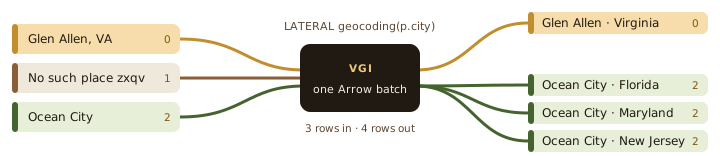
You have a table of place names and a geocoding API. The usual way to combine them is a loop in application code: read the rows, send a request for each one, collect the responses, then merge every response back onto the record that asked for it. It probably looks something like this:
places = db.query("SELECT city FROM places")
rows = []for city in places:                          # one request per row    resp = http.get(GEOCODE_URL, params={"name": city, "count": 3})    matches = resp.json().get("results", [])
    if not matches:                          # no match: keep the row? drop it?        rows.append({"city": city, "state": None})    for m in matches:                        # three matches: three rows        rows.append({"city": city, "state": m["admin1"]})
db.insert("places_geocoded", rows)           # and now join it back
The loop is the easy part; the merge is the fragile one. A place with no match leaves a hole, a place with three matches produces three records, and the code has to remember which results came from which input. It also sends one request at a time, and it asks about a repeated city every time the city appears.
SQL has a join built for exactly this shape, and it is easy to overlook. A LATERAL join lets the right-hand side of a join use columns from the current row on the left. Put the inputs on the left and an API-backed table function on the right, and DuckDB does the merge for you: each input can produce no rows, one row, or many, and every result stays attached to the input that produced it.
That is the easy half. The hard half is making it fast when the function on the right is a remote API, and that is where VGI comes in. VGI, the Vector Gateway Interface, lets DuckDB call table functions that run in another process or service, written in any language, exchanging data as Apache Arrow.
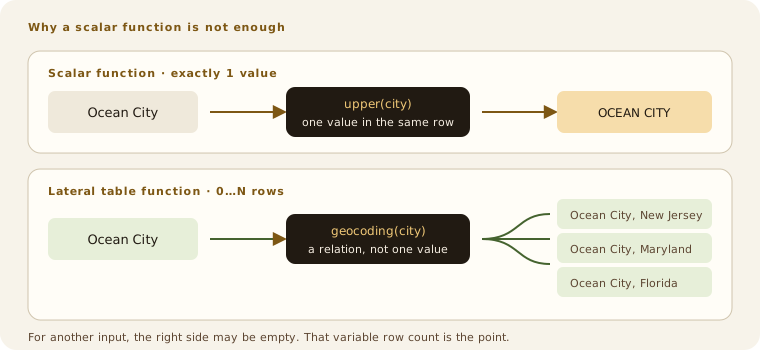
LATERAL table function has a 1→0…N contract, so it can represent no match, one match, or many matches without hiding rows inside a single value.Every SQL example below has a Try it in your browser button. It runs the query in a WebAssembly build of DuckDB (Haybarn) against a hosted Open-Meteo VGI service, the same one used in VGI’s live tour. The first run downloads the engine, so it may take a few seconds.
A table function returns a table
A familiar SQL scalar function returns one value for each call. upper('Ocean City') returns one string. round(3.14159, 2) returns one number. Even when DuckDB evaluates a scalar function over a whole column, each input row still gets exactly one output value.
That contract is too narrow for search-like APIs. A place name may have no match, one obvious match, or several legitimate matches. Packing those into a list-valued scalar is possible, but SQL then needs another operation to turn the list back into rows.
A table function returns a table instead of one value. It may return zero rows, one row, or many rows. Because its result has rows and columns of its own, it belongs in the FROM clause:
SELECT name, latitude, longitude, admin1, countryFROM m.main.geocoding( 'Ocean City', count := 3, country_code := 'US');| name | latitude | longitude | admin1 | country |
|---|---|---|---|---|
| Ocean City | 39.27762 | -74.5746 | New Jersey | United States |
| Ocean City | 38.33650 | -75.08491 | Maryland | United States |
| Ocean City | 30.44103 | -86.61356 | Florida | United States |
Here geocoding is not a stored table but a VGI function backed by the Open-Meteo geocoding API. The call has fixed arguments—'Ocean City', count := 3, and country_code := 'US'—and its result happens to have columns named name, latitude, longitude, admin1, and country.
This is already useful. It lets the rest of SQL treat an external API response like any other relation: select a few columns, filter it, sort it, or join it. DuckDB’s own documentation describes table functions in the same plain terms: they are functions that return a table and can appear in FROM, alongside ordinary table references (DuckDB table functions).
But the argument is still a literal, and it asks about one place. You can repeat the call with a different literal each time, which is reasonable when you are typing two or three values by hand. That falls apart when the inputs already live as rows in a table: you would be turning the table back into a loop of separate queries, then attaching every result to its input again yourself. What we need is one table-shaped operation that says “call this function for every input row.”
Let the left row supply the argument
Start with a tiny table of place names:
WITH places(city) AS ( VALUES ('Glen Allen, VA'), ('No such place zxqv'), ('Ocean City'))SELECT * FROM places;| city |
|---|
| Glen Allen, VA |
| No such place zxqv |
| Ocean City |
We want to feed each city into geocoding. The function call is on the right of places, but its argument refers back to places.city on the left. That backward reference is the correlation, and LATERAL is the SQL word that allows it:
WITH places(city) AS ( VALUES ('Glen Allen, VA'), ('No such place zxqv'), ('Ocean City'))SELECT p.city, g.name AS matched_name, g.admin1, g.countryFROM places AS p, LATERAL m.main.geocoding( p.city, count := 3, country_code := 'US' ) AS gORDER BY p.city, g.country, g.admin1;| city | matched_name | admin1 | country |
|---|---|---|---|
| Glen Allen, VA | Glen Allen | Virginia | United States |
| Ocean City | Ocean City | Florida | United States |
| Ocean City | Ocean City | Maryland | United States |
| Ocean City | Ocean City | New Jersey | United States |
Read the FROM clause from left to right. First there is a row from places, such as Glen Allen, VA. That row supplies the argument to geocoding. The row returned by the function is joined back to that particular input row. Then the same thing happens for the next place.
DuckDB often detects the correlation and makes the LATERAL keyword optional. I still write it. It tells the next person that the reference to p.city is deliberate, and that the right side is not an independent table (DuckDB lateral joins).
There is one more important difference from a scalar function: one input does not have to mean one output.
- A name with no match can return zero rows.
- An unambiguous name can return one row.
Ocean Citycan return many rows.
The result has four rows, not three. Glen Allen, VA produced one match, while Ocean City expanded to three matches in three different states. No such place zxqv produced zero right-hand rows and therefore disappeared. A scalar function cannot express that change in row count; a table function can.
When the left row must survive even when the function returns nothing, use a left LATERAL join:
WITH places(city) AS ( VALUES ('Glen Allen, VA'), ('No such place zxqv'), ('Ocean City'))SELECT p.city, g.name AS matched_name, g.admin1, g.countryFROM places AS pLEFT JOIN LATERAL m.main.geocoding( p.city, count := 3, country_code := 'US') AS g ON trueORDER BY p.city, g.country, g.admin1;| city | matched_name | admin1 | country |
|---|---|---|---|
| Glen Allen, VA | Glen Allen | Virginia | United States |
| No such place zxqv | NULL | NULL | NULL |
| Ocean City | Ocean City | Florida | United States |
| Ocean City | Ocean City | Maryland | United States |
| Ocean City | Ocean City | New Jersey | United States |
Now an unmatched place remains in the result with NULL in the g columns. The inner-versus-left choice is the same as in an ordinary join; only the way the right-hand rows are produced is different.
Notice what is missing from both queries: the loop and the merge. The hole left by a missing place, the three rows from Ocean City, and which input each result belongs to are all handled by the join.
One call can feed the next
Because that association lives in the query plan rather than in application code, the output of one API call can feed straight into another. The weather example on the VGI page first geocodes Glen Allen and then passes the returned coordinates to a forecast function:
SELECT w.time, round(w.temperature_2m, 1) AS temp_f, m.main.weather_code_emoji(w.weather_code) AS icon, m.main.weather_code_text(w.weather_code) AS conditionsFROM m.main.geocoding( 'Glen Allen, VA', count := 1, country_code := 'US' ) AS g, LATERAL m.main.forecast_hourly( g.latitude, g.longitude, forecast_days := 2, temperature_unit := 'fahrenheit' ) AS wWHERE w.time >= now()ORDER BY w.timeLIMIT 6;| time | temp_f | icon | conditions |
|---|---|---|---|
| 2026-08-30 23:00:00+00 | 86.0 | ☀️ | Clear sky |
| 2026-08-31 00:00:00+00 | 81.4 | ☀️ | Clear sky |
| 2026-08-31 01:00:00+00 | 78.3 | ⛅ | Partly cloudy |
| 2026-08-31 02:00:00+00 | 76.8 | ☀️ | Clear sky |
| 2026-08-31 03:00:00+00 | 77.5 | ☁️ | Overcast |
| 2026-08-31 04:00:00+00 | 76.8 | ☁️ | Overcast |
geocoding returns a coordinate. forecast_hourly uses that coordinate and returns many forecast hours. The second function could not be evaluated independently: its latitude and longitude exist only because the first function produced them.
The same shape works over a real input table, chaining both calls for every row:
WITH places(city) AS ( VALUES ('Richmond, VA'), ('Boston, MA'), ('Glen Allen, VA'))SELECT p.city, round(w.temperature_2m, 1) AS temp_c, m.main.weather_code_text(w.weather_code) AS conditionsFROM places AS p, LATERAL m.main.geocoding( p.city, count := 1, country_code := 'US' ) AS g, LATERAL m.main.forecast_current( g.latitude, g.longitude ) AS wORDER BY p.city;| city | temp_c | conditions |
|---|---|---|
| Boston, MA | 27.1 | Overcast |
| Glen Allen, VA | 31.2 | Clear sky |
| Richmond, VA | 31.4 | Clear sky |
In application code that is two loops, two piles of responses, and two merges. Here it is two lines of a FROM clause, and SQL can still filter, project, and combine the result without an application materializing anything in between.
“For each row” is a bad plan for an API
So far this has all been about what a query means. The usual explanation of LATERAL is a loop: for each left row, evaluate the right side. That is a correct description of the result. Taken literally, it is also a bad way to run the query when the right side is a remote API.
A SQL query describes the result we want. DuckDB turns it into a query plan made of executable steps: scan these rows, apply this filter, perform this join, call this table function. DuckDB calls each such step a physical operator. The one that matters here decides how rows are presented to geocoding and how its answers are attached to the left side.
DuckDB’s stock operator for a correlated table function, PhysicalTableInOutFunction, takes the loop literally: it calls the function once per outer row. For a local function that is fine. For an API it is ruinous. Give the three-city query above 5,000 places instead, and it makes 5,000 geocoding calls followed by 5,000 forecast calls: 10,000 round trips, each paying for request setup, scheduling, serialization, and network latency. Those costs soon dwarf the useful work.
Batching loses track of which row asked
The obvious fix is to send the inputs in batches: hand the function a whole chunk of places at once and let it answer them together. But for a table function, that immediately raises a question a scalar function never has to answer.
A scalar function returns exactly one value per input, so output i belongs to input i. A table function makes no such promise. Send it Glen Allen, the missing place, and Ocean City, and it returns four rows: one for Glen Allen, none for the missing place, three for Ocean City. Position no longer means anything. Which inputs do the second, third, and fourth results belong to? Inferring it from output order would silently attach rows to the wrong input the first time a function filtered, fanned out, or sorted differently than expected.
So VGI makes the function say. Alongside its result rows, a batched function returns a parent_row value for each one. It is not a database key, and it is not a row number in the final result. It is only a position in the current input chunk:
| function result | parent_row | copy left values from |
|---|---|---|
| Glen Allen, Virginia | 0 | input row 0 · Glen Allen, VA |
| Ocean City, Florida | 2 | input row 2 · Ocean City |
| Ocean City, Maryland | 2 | input row 2 · Ocean City |
| Ocean City, New Jersey | 2 | input row 2 · Ocean City |
On the wire, that middle column is an int32 array [0, 2, 2, 2], carried as Arrow batch metadata. There is no 1, because input row 1—the deliberately missing place—produced no output. The repeated 2 says that three different output rows all came from the Ocean City input. Nothing has to infer parentage from output order.
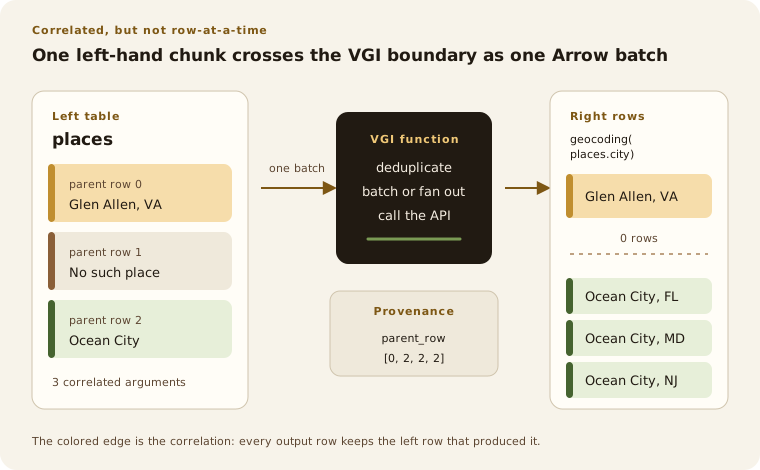
LATERAL table function is a 0→N operation for every row on the left. VGI sends the inputs together and carries the correlation back as parent-row metadata.A strict 1→1 function may omit the array, and VGI uses the identity mapping [0, 1, 2, …]. A function that can filter or fan out must provide it: if the array is missing and the output row count does not match the input row count, VGI raises an error rather than guessing.
The function has to see the whole batch
But parent_row only helps if the function receives a batch in the first place, and DuckDB’s stock operator never hands it one. It passes one city at a time, so by the time the API code runs, the rest of the input chunk is already out of reach. There is nothing left to batch, deduplicate, or schedule concurrently.
One way around that would be a different function, one that accepts a list or a whole table of places. Then every query would have to build the batch and reconstruct the correlation itself, which is the application-code loop again, written in SQL.
So VGI changes the plan instead of the query. An optimizer extension recognizes eligible row-transform table functions, whose positional arguments are per-row inputs rather than constants, and replaces that one plan step with PhysicalVgiLateralBatch (shown as VGI_LATERAL_BATCH by EXPLAIN). The new operator takes a vector-sized DuckDB input chunk, sends its arguments to the function as one Arrow batch, and uses the returned parent_row values to copy the right left-hand columns onto every output row. The SQL does not change. The rewrite is deliberately narrow: when a function or plan is not eligible, DuckDB’s stock operator stays in place, and SET vgi_batch_lateral=false restores it everywhere.
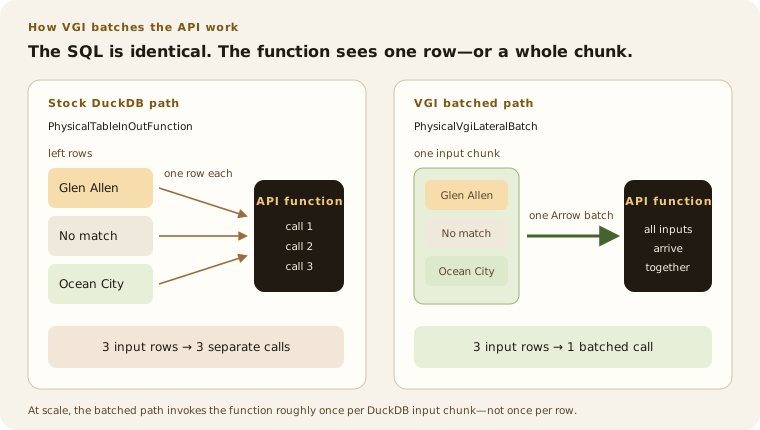
Now the API code receives useful work instead of a procession of single values. It can call an upstream bulk endpoint once. If the API has no bulk endpoint, it can issue bounded concurrent requests: the TypeScript Open-Meteo function, for example, receives a batch of place names and runs its geocoding requests with at most eight in flight at once.
One batched VGI call does not magically mean one HTTP request; the upstream API decides what can be combined. What changes is that the function receives the inputs together, so it has the option. A row-at-a-time interface has already thrown that option away.
The difference is visible in VGI’s tests. A correlated query over 5,000 inputs makes a handful of calls to the function, one per input chunk (a few more when DuckDB processes chunks in parallel), instead of roughly 5,000. Separate tests compare the batched plan with the row-at-a-time fallback for 1→0, 1→1, and 1→N functions and require identical result multisets. The optimization changes the trip across the boundary, not the meaning of the query.
A batch still carries repeats
Batching cuts the number of round trips, but it does nothing about asking the same question twice. Many useful API workloads are lower-cardinality than their row counts suggest: millions of customer records but a few hundred city names, many events but a small vocabulary of labels, or repeated locations across a shipment table.
DuckDB already handles part of this. For a plain column argument such as geocoding(p.city), when it decorrelates a LATERAL join it takes the distinct values of the correlated columns, evaluates the right-hand side once for each, and joins the answers back onto every left row. DuckDB calls this a delim join. A shipment table with a million rows and three hundred distinct cities asks geocoding about three hundred cities before VGI does anything.
But that does not cover arguments computed from the left row, and real inputs are messy enough that the argument is often an expression:
WITH places(city) AS ( VALUES ('Ocean City'), ('ocean city'), (' OCEAN CITY '))SELECT p.city, g.admin1FROM places AS p, LATERAL m.main.geocoding( lower(trim(p.city)), count := 3, country_code := 'US' ) AS gORDER BY g.admin1, p.city;| city | admin1 |
|---|---|
| OCEAN CITY | Florida |
| Ocean City | Florida |
| ocean city | Florida |
| OCEAN CITY | Maryland |
| Ocean City | Maryland |
| ocean city | Maryland |
| OCEAN CITY | New Jersey |
| Ocean City | New Jersey |
| ocean city | New Jersey |
DuckDB deduplicates p.city, and those are three different values. Only after lower(trim(…)) do they become the same argument. So VGI deduplicates the argument tuples it is about to send in each chunk: the function looks up ocean city once, and VGI copies the three matches back onto all three input rows, nine rows in total, each keeping its own original spelling of city.
But deduplication changes how many times the function actually runs, and that is only safe when running it again would give the same answer. So VGI gates it on the function’s declared stability.
A CONSISTENT function promises the same arguments have the same result. CONSISTENT_WITHIN_QUERY makes that promise for the duration of one query. Both are safe to deduplicate inside an input chunk. A VOLATILE function is not: random values, wall-clock reads, and calls with observable side effects may legitimately do something different each time, so VGI sends every occurrence. The session setting vgi_exchange_input_dedup can also disable the optimization entirely.
This is a contract, not a heuristic VGI can infer by watching the output. The SDK default is CONSISTENT, so a function author must explicitly mark volatile behavior. In SQL terms, that is the right division: an optimizer may reuse a pure function result, but it must not silently reduce the number of calls to a volatile or side-effecting function. Geocoding is a natural fit for deduplication; an API operation that charges a card or advances a cursor is not.
How other query engines handle LATERAL
Is any of this particular to DuckDB? Each problem above added a requirement, so other engines can be checked against the same list:
- Correlation in plain SQL. The left row supplies the argument, as
LATERALdoes. - 0→N output. Each input may produce no rows, one row, or many.
- A batch the function can see. User code receives many correlated inputs at once, not one at a time.
- The association restored automatically. The engine, not the query author, reattaches every result to the input that produced it.
I surveyed the current releases and documentation for DataFusion, Spark, Trino, SQLite, and Polars on 23 September 2026. Several have two or three of these. Outside DuckDB with VGI, I did not find one that puts all four on the same path.
DuckDB + VGI
 DuckDB + VGI
- Correlated 0→N SQL
- Yes:
LATERAL f(t.x) - Batch reaches user code
- Yes: Arrow chunks plus parent-row provenance.
- Practical external-API path
- Direct. Inputs can also be deduplicated, with caching available when the function advertises a sound policy.
DataFusion 55
 DataFusion 55
- Correlated 0→N SQL
- Yes, with basic
LATERALsubqueries. - Batch reaches user code
- Partly. Async scalar UDFs are vectorized but remain 1→1; UDTFs create a
TableProviderduring planning. - Practical external-API path
- Return a list from an async UDF and
UNNESTit in the select list, or build a custom plan. There is no single batched 0→N UDTF interface.
Spark 4.2
 Spark 4.2
- Correlated 0→N SQL
- Yes, for ordinary SQL and Python UDTFs.
- Batch reaches user code
- Not on the same path. Classic UDTFs can be used laterally but are row-oriented; Arrow UDTFs are batched but barred from
LATERAL. - Practical external-API path
- Batch through a table argument and carry a key for a later join, or accept row-at-a-time
LATERALevaluation.
Trino 483
 Trino 483
- Correlated 0→N SQL
- Yes, but table-function scalar arguments must be constant.
- Batch reaches user code
- Row semantics are explicitly row by row; set semantics hand pages to a connector.
- Practical external-API path
- Use a table argument and a custom Java connector. Batching changes the call from row semantics to set or partition semantics.
SQLite 3.53
 SQLite 3.53
- Correlated 0→N SQL
- Yes in effect: correlated virtual table functions, without the keyword.
- Batch reaches user code
- No vector-input contract.
- Practical external-API path
- An eponymous virtual table can receive the left value as a hidden-column constraint, but scans are still per invocation.
Polars 1.44
 Polars 1.44
- Correlated 0→N SQL
- No
LATERALjoin or custom SQL table-function surface. - Batch reaches user code
- Yes, in the expression API with
map_batches. - Practical external-API path
- Batch in application code, return a list column, then
explode. It works, but is not a callable correlated relation in SQL.
DataFusion
DataFusion 54 added basic CROSS, INNER, and LEFT JOIN LATERAL support in June 2026. Its implementation uses decorrelation rather than literally re-running a subquery for every left row, which is the right foundation. It still has documented limits: outer references in the LATERAL subquery’s select list and HAVING inside a lateral subquery are both listed as unsupported, and the keyword is mandatory—DataFusion does not detect correlation on its own (DataFusion 54 release, current lateral syntax).
For extension authors, however, DataFusion’s two useful APIs stop on opposite sides of the problem. An async scalar UDF receives Arrow arrays and even declares an ideal batch size, making it a good place for network I/O—but scalar UDF output has the same number of rows as its input, so it fails requirement 2. A table UDF can return an arbitrary table, but its interface takes expressions and creates a TableProvider during planning; it is not handed a runtime batch of correlated values, so it fails requirement 3 (DataFusion UDF guide). You can compose an async UDF that returns lists with an UNNEST, but you are building the bridge yourself—and the UNNEST has to sit in the select list, because DataFusion does not yet support implicit lateral references from a FROM-clause UNNEST such as FROM orders AS t, UNNEST(t.items).
Spark
Spark is the closest comparison, and its current behavior is especially revealing. A normal Python UDTF can be used laterally and yield any number of rows, but its eval method is invoked for each input row. Arrow makes transfer cheaper; it does not change that row-oriented call contract (PySpark UDTFs).
Spark 4.1 introduced a genuinely vectorized arrow_udtf: it receives PyArrow arrays or record batches and can emit zero or more batches. That sounds like the whole answer. But Spark explicitly disallows lateral joins with Arrow Python UDTFs: the analyzer rejects LATERAL arrow_udtf(…) and points you to a TABLE(…) argument instead, and Spark 4.2 kept that restriction (Arrow UDTF guide, SPARK-52982, apache/spark#52048). Spark has requirements 1, 2, and 3, but not on the same path, and the gap between them is requirement 4: an arbitrary output batch needs a way to say which outer input produced each of its 0→N rows. VGI’s parent_row metadata supplies exactly that map.
Trino
Trino has both LATERAL and a serious polymorphic table-function API. Its table functions can process pages, report pass-through row indexes, and work with external systems. But scalar table-function arguments must be constant, so a per-row input arrives as a table argument instead. Declare that argument with row semantics and Trino says plainly that it is processed row by row. Declare set semantics and the function can process pages, but the author now owns partitioning, pass-through columns, and a connector plugin rather than writing f(t.x) (Trino table functions, developer guide). Capable machinery, certainly. But not the same easy call shape.
SQLite and Polars
SQLite is the charming exception to the syntax test. It has no LATERAL keyword, yet its table-valued virtual tables can take a left-hand column as an argument. The official JSON example is FROM user, json_each(user.phone): json_each produces zero or more rows for each phone value. Underneath, function arguments become constraints on hidden virtual-table columns (SQLite JSON functions, virtual table functions). That gives the right relational result, but the virtual-table interface offers no batch of outer values to an API client.
Polars has the inverse strengths. Its SQL interface documents file-reading table functions, ordinary joins, and UNNEST. Polars 1.44 added correlated subqueries to that SQL layer, but it has no LATERAL join and no way to register a custom SQL table function (Polars SQL SELECT). Its expression API does have map_batches, and a function can return list-shaped results that are later exploded (Polars map_batches). So the computation is possible and can be efficiently batched; the application has to assemble the correlation and expansion outside the SQL table-function model.
The result of the survey is not that other engines cannot do useful versions of this. They can. The point is that the four requirements rarely arrive together, and each one missing puts a piece of the loop-and-merge back into application code.
Why DuckDB is still the best fit
For this kind of API-shaped work, I have not found anything that fits better. LATERAL lets SQL express the real shape of the work: there is a table of things we know, a function that can discover more about each one, and a result whose cardinality is not known in advance. No temporary table or client-side merge is needed to explain that.
VGI makes the physical execution match modern service interfaces. Inputs reach the function in Arrow batches. Repeated arguments can be collapsed when the function is pure. The API integration can use a bulk endpoint or controlled concurrency. Its output carries enough provenance for DuckDB to reconstruct the correlated result exactly, including the awkward zero-row and many-row cases.
That is an unusually good division of labor. SQL says which rows depend on which other rows. DuckDB plans and joins them. VGI handles the batch boundary. The function integration worries about the API. And the query still looks like a query.