
Grainlift now lets you query data stored in Cloudflare’s D1, Durable Objects, and Workers Analytics Engine from Haybarn, DuckDB, Python, and other ADBC applications. You can browse tables and run SQL. In Haybarn or DuckDB, you can also join the results with a local CSV or Parquet file. Choose the browser, terminal, or Python tab below to try it yourself.
D1 is Cloudflare’s managed SQLite database service. A Durable Object combines application code with its own persistent state, which can include a SQLite database. Workers Analytics Engine stores events written by your application, such as page views and API requests.
The Cloudflare gateway runs in a Worker in your Cloudflare account. Clients connect through the Grainlift driver using ADBC, the Arrow Database Connectivity interface, and receive results in the columnar format used by Apache Arrow. Durable Object and D1 connections support reads and writes; Analytics Engine connections are read-only.
In the browser demo, Haybarn and the Grainlift ADBC driver both run as WebAssembly. The grainlift extension has the Rust ADBC driver compiled in because browser WebAssembly cannot load native ADBC drivers at runtime. Your tab connects to the Cloudflare Worker over HTTPS and receives Arrow results.
Compiling an ADBC driver to WebAssembly isn’t enough to make it work in a browser. Many drivers expect raw TCP sockets or access to the local filesystem, which the browser doesn’t provide in the same way. Grainlift works here because its browser build uses vgi-rpc to send requests and receive Arrow results over HTTP(S).
Beyond this Cloudflare example, a Grainlift server can run locally or on a remote machine and proxy calls to any ADBC driver installed there. That driver keeps its normal networking and filesystem access. A WebAssembly client can then query the databases behind those drivers through Grainlift without having to port each driver to the browser. We’ll cover that setup in a future post.
Start with a real database
The demo has a small coffee-shop database with six products, twelve orders, and a table where you can leave a note. The sample data lives in a Durable Object running on Cloudflare.

orders.product_id to products.id. The notes and reset information live in separate tables.Everyone uses the same disposable database. Other readers can see and change anything you add. Every four hours, at 00:00, 04:00, 08:00, 12:00, 16:00, and 20:00 UTC, the database resets to its original sample data. Use made-up data only.
Choose where you’d like to try it. All three examples connect to the same database.
Run in your browser
Click Try it in your browser below. The first run downloads the WebAssembly build of Haybarn, which can take a little while. It then connects without requiring a sign-in and runs the query. You can edit the SQL in the shell afterward.
-- Install and load the Grainlift extension.INSTALL grainlift FROM community;LOAD grainlift;
-- Connect to the shared demo database as shop.ATTACH IF NOT EXISTS 'grainlift+https://grainlift-cloudflare-public.rusty-bb6.workers.dev'  AS shop (TYPE grainlift, target 'demo');
-- Calculate units sold and revenue for each product.SELECT p.name, sum(o.quantity) AS units,       round(sum(o.quantity * p.price_cents) / 100.0, 2) AS revenueFROM shop.orders oJOIN shop.products p ON p.id = o.product_idGROUP BY p.nameORDER BY revenue DESC;
To see the next reset time:
SELECT description, next_reset_at FROM shop.demo_info;Run the same query from your terminal
Native Haybarn and DuckDB use adbc_scanner to load the Grainlift ADBC driver. The browser’s grainlift extension has that driver built in. Both connect to the same gateway and can query the same Durable Object database.
Install the Grainlift driver from PyPI in a Python 3.13 or newer environment, then print the path to its native library:
python -m pip install adbc-driver-grainliftpython -c "import adbc_driver_grainlift; print(adbc_driver_grainlift.driver_path())"Start Haybarn:
uvx haybarn-cliPaste the SQL below, replacing /path/to/grainlift-driver with the path printed above. After connecting, the SELECT is exactly the same as in the browser:
-- Load the extension that connects Haybarn to ADBC drivers.INSTALL adbc_scanner FROM community;LOAD adbc_scanner;
-- Connect using the native Grainlift driver you installed.ATTACH 'grainlift+https://grainlift-cloudflare-public.rusty-bb6.workers.dev'  AS shop (TYPE adbc, driver '/path/to/grainlift-driver',    entrypoint 'AdbcDriverGrainliftInit', "grainlift.target" 'demo');
SELECT p.name, sum(o.quantity) AS units,       round(sum(o.quantity * p.price_cents) / 100.0, 2) AS revenueFROM shop.orders oJOIN shop.products p ON p.id = o.product_idGROUP BY p.nameORDER BY revenue DESC;
Why the setup differs
On the desktop, an ADBC driver manager loads a native driver library into the process using
dlopen()or its platform equivalent. Browser WebAssembly can’t load those native libraries, so thegrainliftextension has the driver compiled in. Native Haybarn and DuckDB useadbc_scannerto load it separately. Once connected, the sameSELECTworks in both.
You can also use this native setup with the DuckDB CLI by replacing uvx haybarn-cli with duckdb.
Connect from Python or another ADBC application
Python can load the same native driver directly. Save this as query_demo.py. The comments at the top tell uv which Python version and packages it needs:
# /// script# requires-python = ">=3.13"# dependencies = ["adbc-driver-grainlift", "pyarrow"]# ///
from adbc_driver_grainlift import dbapi
with dbapi.connect(db_kwargs={    "grainlift.uri": "grainlift+https://grainlift-cloudflare-public.rusty-bb6.workers.dev",    "grainlift.target": "demo",}, autocommit=True) as connection:    with connection.cursor() as cursor:        cursor.execute("SELECT name, price_cents FROM products ORDER BY name")        print(cursor.fetch_arrow_table())
Then run it with uv installed:
uv run query_demo.pyuv selects a compatible Python version, downloading it if needed, and installs the dependencies in an isolated environment. The script connects directly to the remote database, so the query uses products without the shop alias that Haybarn adds locally. The result is a PyArrow table you can use in the rest of your Python code.
The Grainlift ADBC driver is available on PyPI today. We also plan to distribute it through dbc. Other applications that can load an ADBC driver can use the same native library; the driver documentation explains how to locate it and connect.
The same database in Cupola
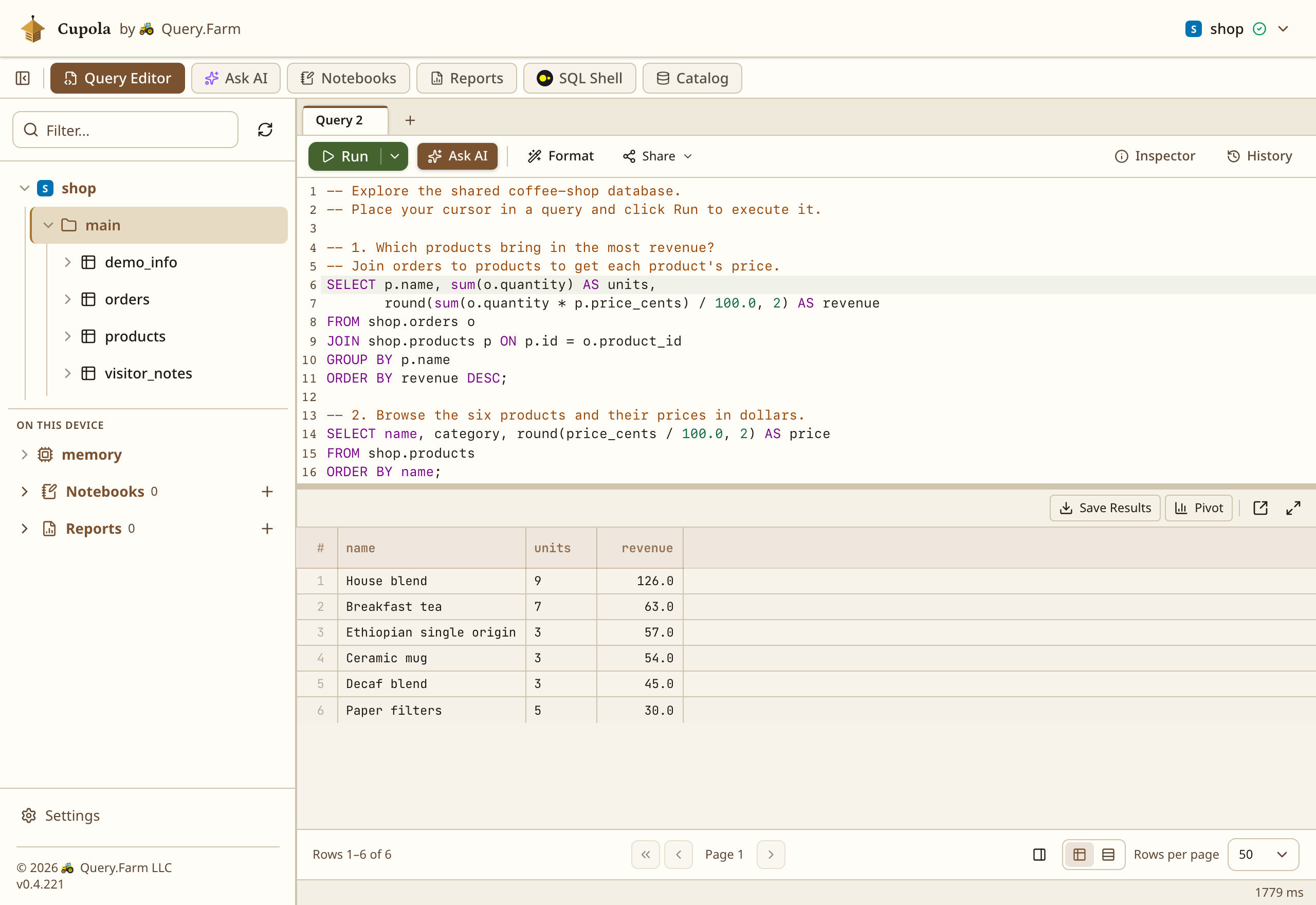
For more space to work, open the example queries in Cupola, a browser-based SQL client with a table browser and SQL editor.
The link connects to the same shared database and opens five commented queries in a new editor tab: product revenue, the product list, sales by city, visitor notes, and the next reset time. Place your cursor in a query and click Run to execute it. No sign-in is required.
Add a note here, then query visitor_notes in Cupola to see it there. grainlift_execute runs the statement directly in the remote database, so this INSERT uses SQLite syntax:
CALL grainlift_execute('shop', '  INSERT INTO visitor_notes (id, note)  VALUES (lower(hex(randomblob(16))), ''Hello from the blog'')');
SELECT note, created_atFROM shop.visitor_notesORDER BY created_at DESCLIMIT 10;
The note stays in the database when you reload this page. Other clients can read it until someone deletes it or the database resets.
Bring something of your own to the query
You can also join the remote tables with data you supply to DuckDB. This query defines sales targets in the browser and compares them with orders in the Durable Object:
WITH targets(city, target_units) AS ( VALUES ('Richmond', 10), ('Boston', 12), ('Portland', 15))SELECT t.city, t.target_units, coalesce(sum(o.quantity), 0) AS units_sold, t.target_units - coalesce(sum(o.quantity), 0) AS units_to_goFROM targets tLEFT JOIN shop.orders o ON o.city = t.cityGROUP BY t.city, t.target_unitsORDER BY t.city;The local data could also come from a CSV or Parquet file. DuckDB performs the join in your browser. Where the remote source supports it, Grainlift can send filters and column selections to that source to reduce the data returned.
What sits between the query and the data
The demo uses two Durable Objects. GrainliftGateway manages database connections and query results. BlogDemo stores the coffee-shop tables. The same gateway can also connect to your application’s Durable Objects, D1 databases, and Analytics Engine datasets.

The Cloudflare Worker forwards HTTPS requests to the gateway Durable Object, which holds open sessions in memory. If Cloudflare unloads an idle gateway, those sessions are lost. The driver can open a new session for the next autocommit query – a query outside an explicit transaction. The data in your application’s Durable Object stays intact.
The target option tells the gateway which data source to connect to. Along with running queries, it can return table names and column types so clients such as Cupola can show you what’s available.
Reaching an application’s Durable Object
The gateway’s Cloudflare Worker can’t read another Durable Object’s SQLite database directly. Your application needs to expose methods the gateway can call. You’ll also need a binding, which lets the Worker access your application’s Durable Object class.
The GrainliftSqlObject base class provides those methods. They let the gateway read rows, read rows as objects, and run a batch of writes that either all succeed or all fail.
For example, a chat application might use one Durable Object per chat room, with each object storing that room’s messages. Its ChatRoom class can extend GrainliftSqlObject while keeping the application’s existing methods:
import { GrainliftSqlObject } from './grainlift-sql-object';
export class ChatRoom extends GrainliftSqlObject {  // Your constructor creates the tables.  // Your application methods continue to use this.ctx.storage.sql.}
If the gateway has a binding named CHATS for that class, this connection selects the object named general:
ATTACH 'grainlift+https://your-gateway.workers.dev' AS room  (TYPE grainlift, target 'durable_object',   "cloudflare.durable_object.namespace" 'CHATS',   "cloudflare.durable_object.name" 'general',   bearer_token 'your-gateway-token');
SELECT author, body, sent_atFROM room.messagesORDER BY sent_at DESCLIMIT 20;
This attaches one chat room’s database. It does not query every object in CHATS. The namespace option identifies the collection of objects belonging to that class; the name option selects one of them. The gateway’s permission rules decide which collections and objects a caller may access, and whether they may write. The demo target used earlier is a shortcut to one fixed object, so its Cupola link needs no extra connection options.
Connecting D1 and Analytics Engine
D1 does not need an application class or remote methods. Configure a database binding on the gateway, grant the caller access, and use that binding’s name in the connection options:
ATTACH 'grainlift+https://your-gateway.workers.dev' AS app  (TYPE grainlift, target 'd1',   "cloudflare.d1.database" 'DB',   bearer_token 'your-gateway-token');
SELECT * FROM app.orders LIMIT 10;
Both D1 and SQLite-backed Durable Objects support atomic write batches. If you use a transaction that buffers writes until commit, reads made before the commit will not include those pending writes.
For Analytics Engine, the gateway calls Cloudflare’s SQL API using an account ID and an API token with Account Analytics Read permission. Each dataset appears as a table. You can supply credentials when you connect, or configure the gateway to provide them for callers you’ve granted access. The setup instructions cover both options.
Analytics Engine retains its own SQL dialect and sampling behavior. To account for sampled events, this query sums _sample_interval:
-- With your Analytics Engine target attached as ae:SELECT blob1, sum(_sample_interval) AS eventsFROM ae.request_eventsGROUP BY blob1ORDER BY events DESC;Replace request_events with your dataset’s name. The query groups events by the value in blob1, one of Analytics Engine’s text fields. What that field represents depends on the data your application writes.
Analytics Engine’s remote SQL supports one dataset per query. DuckDB can do further work, including joins, on the returned rows.
Put a gateway next to your data
The Cloudflare gateway repository has deployment instructions, permission examples, and the Durable Object base class. Deploy the gateway in your account, configure bindings for the D1 databases and Durable Object classes you want it to reach, and grant callers access. For Analytics Engine, supply the account ID and API token described above. The gateway also supports sign-in through an OpenID Connect identity provider.
Our public worker is deliberately anonymous because it contains disposable sample data. Your gateway can use individual tokens or your identity provider, with permissions scoped to the databases each person needs.
Start with the shared demo queries in Cupola, or follow the gateway’s deployment instructions to connect your own Cloudflare data. For Python and other ADBC applications, use the Grainlift driver.