Building a VGI worker
A worker is a program that exposes functions, tables, and whole catalogs to DuckDB. This page is the decision, not the code: whether to build one, what it can offer, and which language to write it in — then it hands you to that SDK's own tutorial.
Most people never build a worker — they attach one somebody else built. You build one when you own something DuckDB can't reach on its own, and you'd rather expose it than copy it.
The decision
Should you build a worker?
A worker earns its keep when the thing you want to query lives behind code — an API, a model, a service, a proprietary format — and the alternative is exporting it on a schedule. If the data is already sitting in a file DuckDB can open, stop here.
Build one when…
- You own an API, a dataset, a model, or an internal service, and you want SQL access to it without building a pipeline first.
- The logic already exists in a language you like — a Python model, a Go client library, a Rust parser — and porting it to C++ isn’t worth it.
- You want to hand a colleague or a customer a URL instead of an export.
- Access rules belong at the source: per-user auth, row and column filtering, metering, audit.
- You want it to keep working across DuckDB releases without a rebuild-and-resign matrix.
Reach for something else when…
- The data is already a file DuckDB reads — Parquet, CSV, JSON, on disk or in object storage. Just query it.
- An extension already does the job. Check the catalog before you write anything.
- The whole thing is a few lines of SQL. A macro or a view is smaller and faster.
- You need in-process, billion-rows-a-second scalar throughput on the hottest path — a native extension still wins there.
Before writing anything, check the extension catalog and the Orchard — someone may have already built what you need. The trade-off against a native C++ extension is laid out on the architecture page.
Scope
What a worker can offer
A worker is not limited to scalar UDFs. It can implement every DuckDB function shape, and it can present itself as a catalog — schemas, tables, and views that behave like any attached database. Decide how far you want to go before you pick an SDK; the answer is the same in every language.

Scalar
1 row → 1 value
The everyday UDF. Transform each row — but vectorized: you receive whole Arrow columns, not a per-row callback.

Table
args → N rows
Generate rows from arguments. The usual shape for wrapping an API, a dataset, or a search endpoint.

Table-in-out
N rows → M rows
Consume a relation and stream a transformed one back, batch by batch. Nothing is buffered, so input size is unbounded.

Aggregate
N rows → 1 value
Usable in GROUP BY and over windows. Partial states combine, which is what lets DuckDB run it in parallel.
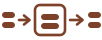
Buffering
stream → [state] → stream
For work that must see every input row first — a global sort, a top-k, a full reduction — then emits.
Beyond functions
Whole catalogs
Schemas, tables, and views that show up in information_schema. Column statistics and projection / filter / LIMIT pushdown mean the worker sends back less.
Authentication
Callers arrive with a token or a DuckDB secret, so the worker knows who is asking before it answers.
Authentication →Row & column security
Filter rows and mask or drop columns per identity, at the source — the client never receives what it isn’t entitled to.
Row & column security →Observability
OpenTelemetry traces and structured logs that surface back in the calling session, so a slow query is debuggable from both ends.
Architecture →The SDK
Choosing a language
There are six implementations of the protocol, and they all speak the same wire format — a single DuckDB session can attach workers written in different languages and join across them. So the choice is mostly about your code, not about VGI: pick the language your logic already lives in, or the one your team runs in production.
Most can also be deployed as hosted HTTP services rather than only launched locally. C# currently supports stdio and pooled Unix sockets in its worker SDK, so choose another SDK when HTTP hosting is a hard requirement. See sharing and distribution options.
| Language | Status | Local transports | HTTP (hostable) | Tutorial |
|---|---|---|---|---|
| C# | Worker feature parity | Pipes, subprocess, Unix socket | Not yet | Docs → |
| Go | Feature parity | Pipes, subprocess, Unix socket | Yes | Docs → |
| Java | Feature parity | Pipes, subprocess, Unix socket, shared memory | Yes | Docs → |
| Python | Reference implementation | Pipes, subprocess, Unix socket, shared memory | Yes | Docs → |
| Rust | Feature parity | Pipes, subprocess, Unix socket | Yes | Docs → |
| TypeScript | Feature parity | Pipes, subprocess, Unix socket | Yes | Docs → |
Rules of thumb
C#
.NET services and libraries. Strong Arrow types, one publishable executable, and direct access to the C# ecosystem.
Go
One static binary to ship and a mature HTTP server. Easy to hand someone a release artifact they just run.
Java
JVM shops. Annotation-driven functions that reach the drivers and internal libraries you already run.
Python
The reference SDK, and the shortest path if your logic is already Python — ML, pandas, or the scientific stack.
Rust
Throughput and tight memory control, tracking the Python reference byte-for-byte on the wire.
TypeScript
Bun, Node, and Deno — and the natural pick for edge and serverless runtimes that only speak HTTP.
Full descriptions, install lines, and repositories for each SDK are on the languages page. VGI is a protocol, so a language that isn't listed can still implement it — the wire-protocol spec is public.
Deployment
How a worker runs
Whatever you write it in, the worker ends up in one of two postures — and the code doesn't change between them, only the flag you start it with. That's worth knowing before you build, because it decides whether the people who use it need to run anything.
-- 1. DuckDB spawns the worker for you and talks over pipes.
--    Nothing is deployed; nothing touches the network.
ATTACH 'sales' AS sales (TYPE vgi, LOCATION 'uv run worker.py');

-- 2. Or it calls a worker you host. One deployment, any number of sessions.
ATTACH 'sales' AS sales (TYPE vgi, LOCATION 'https://worker.example.com/');

-- Either way, what the worker exposes is now ordinary SQL.
SELECT * FROM sales.main.orders WHERE region = 'EU' LIMIT 10;
The first form is how you'll develop: ATTACH a command, and
DuckDB spawns and pools the process for you. The second is how you hand it to other
people. See Architecture for the transports and
the hosting options, and Connect to a worker
for what the far side of the ATTACH looks like.
Start writing
Your language's tutorial
Each SDK carries its own tutorial, how-to guides, and API reference — the shapes above, written the way that language writes them. Pick yours and start there.
C#
Tutorial, how-to guides, and full API reference →
Go
Tutorial, how-to guides, and full API reference →
Java
Tutorial, how-to guides, and full API reference →
Python
Tutorial, how-to guides, and full API reference →
Rust
Tutorial, how-to guides, and full API reference →
TypeScript
Tutorial, how-to guides, and full API reference →
A worked example
Ship one with an agent
A worker is small enough that an AI coding agent can write and deploy one from a dataset URL. Here we expose the NYC Department of Finance Summary of Neighborhood Sales by Neighborhood dataset as a hosted worker. You will need an agent such as Claude Code or Codex, and a Fly.io account.
Fly.io is only there to give the worker a public URL, and you most likely will not be
charged — Fly Machines scale to zero when idle. To skip the signup entirely, use the
follow-up prompt below and run it locally with uv run instead.
Clone the SDK, then prompt the agent
Clone the repository and give your agent the local path, so it can read the examples and test fixtures rather than guess at the API.
git clone https://github.com/Query-farm/vgi-python.git
cd vgi-pythonLook at this vgi-python repository and make me a new VGI worker that exposes
the NYC Department of Finance "Summary of Neighborhood Sales by Neighborhood"
dataset to DuckDB consumers:
https://data.cityofnewyork.us/City-Government/DOF-Summary-of-Neighborhood-Sales-by-Neighborhood-/5ebm-myj7/about_data
Follow the examples and test fixtures in vgi-python.
Requirements:
- Expose the data as a SQL table named nyc_dof_sales.main.neighborhood_sales.
- Add useful column names and types for neighborhood housing analysis.
- Include comments in the SQL/catalog metadata so a future agent understands the dataset.
- Add tests that prove Haybarn/DuckDB consumers can query the worker.
- Deploy the worker to Fly.io and give me the hosted VGI URL and ATTACH statement.
- Configure Fly Machines to scale to zero when idle.To keep it local instead of deploying:
Change this worker so I can run it locally with uv run instead of deploying it.
Give me the Haybarn ATTACH statement for the local process.
Attach what it built
The finished project gives you a URL and the exact ATTACH
statement. From here it is just a worker like any other — see
Getting started for the consumer side.
-- Replace the LOCATION with the Fly.io URL your agent gives you.
ATTACH 'nyc_dof_sales' AS nyc_dof_sales (
  TYPE vgi,
  LOCATION 'https://your-nyc-dof-sales-worker.fly.dev/'
);

-- Confirm the worker exposes the expected table.
SELECT table_schema, table_name, table_type
FROM information_schema.tables
WHERE table_catalog = 'nyc_dof_sales'
ORDER BY table_schema, table_name;
And now the dataset answers questions. This one looks for neighborhoods still under $1M that have grown fastest over five years.
┌──────────────┬───────────────┬───────────────────────────┬───────────────────┬───────────────┐
│ borough_name │ neighborhood  │       type_of_home        │ median_sale_price │ growth_5y_pct │
│   varchar    │    varchar    │          varchar          │       int64       │    double     │
├──────────────┼───────────────┼───────────────────────────┼───────────────────┼───────────────┤
│ Queens       │ Kew Gardens   │ 03 THREE FAMILY DWELLINGS │            915000 │         357.5 │
│ Queens       │ Rockaway Park │ 03 THREE FAMILY DWELLINGS │            929000 │         298.3 │
│ Queens       │ Holliswood    │ 02 TWO FAMILY DWELLINGS   │            879400 │         265.0 │
└──────────────┴───────────────┴───────────────────────────┴───────────────────┴───────────────┘
Show the SQL
-- Find neighborhoods that are still relatively cheap but growing fast.
WITH recent_growth AS (
  SELECT
    borough_name,
    neighborhood,
    type_of_home,
    year,
    median_sale_price,
    LAG(median_sale_price, 5) OVER (
      PARTITION BY borough_name, neighborhood, type_of_home
      ORDER BY year
    ) AS price_5y_ago
  FROM nyc_dof_sales.main.neighborhood_sales
)

SELECT
  borough_name,
  neighborhood,
  type_of_home,
  median_sale_price,
  ROUND(
    100.0 * (median_sale_price - price_5y_ago)
    / NULLIF(price_5y_ago, 0),
    1
  ) AS growth_5y_pct
FROM recent_growth
WHERE price_5y_ago IS NOT NULL
  AND median_sale_price < 1000000
ORDER BY growth_5y_pct DESC
LIMIT 3;
Nothing here is unique to NYC housing, or to Fly.io. The distinctive part is how short the path is from "I have a dataset or an API" to "my team can query it in SQL, and join it against everything else they already attach."
Next
Then share it
A worker that only runs on your laptop is a script. Once it works, the next decision is who else gets to attach it — your team, anyone with a GitHub link, or paying customers on the Orchard.
Distributing a worker
Publishing releases on GitHub, shipping a container people can spawn, hosting it as a service, or listing it on the Orchard and earning a revenue share on subscriptions.