Use native ADBC drivers from WebAssembly with Grainlift. Connect PostgreSQL to Haybarn or Cupola in the browser while keeping drivers and credentials on the server.
An ADBC (Arrow Database Connectivity) driver already knows how to connect to your database, discover its tables, and return Apache Arrow results. If you want to query that database from a browser, you should be able to keep using the driver you have.
Grainlift makes that possible. A gateway loads your native ADBC driver on your computer or server. The browser connects through Grainlift’s WebAssembly client and receives Arrow results. Your existing driver keeps its normal networking and filesystem access.
That gives a browser application one client interface for the databases behind those drivers. You can explore their tables in Cupola, run SQL in the WebAssembly build of Haybarn, and combine remote results with data loaded into the browser.
The previous article used a Cloudflare Worker to expose Durable Objects, D1, and Analytics Engine through Grainlift. Here, the gateway delegates database operations to an existing native ADBC driver.
How ADBC works in the browser
ADBC defines a common interface for database connections, statements, metadata, and Arrow result batches. Drivers implement that interface for their particular databases.
A native application typically loads an ADBC driver as a shared library using dlopen() or its platform equivalent. That library may open TCP connections, read certificate files, or depend on other native libraries. Those assumptions make it difficult to move into a browser. Compiling the code to WebAssembly does not supply all the operating system facilities it expects.
Grainlift leaves that driver on the server. Its browser client forwards ADBC operations through vgi-rpc, using HTTP(S) for the connection shown here. The native gateway calls the downstream driver and returns its results as Arrow batches.
Only the Grainlift client needs a browser build. It is compiled into Haybarn’s grainlift extension. Adding another database means configuring another driver on the gateway, without building a database-specific browser client.
Browser applications have been able to query databases through HTTP APIs and custom backends for years. The useful part here is reusing the ADBC drivers that already do the database work, through the same interface across browser and native clients.
Connect PostgreSQL through its ADBC driver
PostgreSQL makes a useful example because its ADBC driver wraps libpq, PostgreSQL’s native client library. The gateway runs that driver with its normal network access. The browser talks to Grainlift.
This walkthrough assumes you have a PostgreSQL database and a database account for the queries you want to run. Run the gateway on a machine that can reach that database. For exploration, a database account with read-only permissions is a good fit.
Use the PostgreSQL ADBC driver already installed on that machine, or install one with dbc, the ADBC driver package manager:
dbcinstallpostgresql--leveluser
Create a grainlift.toml file with the following configuration. Replace <gateway-token> with a token you generate, for example with openssl rand -hex 32, and replace the PostgreSQL URI with your connection details.
analytics is a name you give this target. It selects the installed driver and its connection settings. With these options, the client cannot substitute a different database URI. The PostgreSQL password stays on the gateway; the browser uses the separate gateway token.
The driver name resolves through the manifest installed by dbc. If you already have a driver installed another way, driver can instead be its absolute library path. Keep the configuration file private because it contains credentials.
Already have an ADBC connection profile? Grainlift 0.6.0 can reuse an existing ADBC connection profile on the gateway machine. Replace the [targets.analytics] section and its database_options block above with:
[targets.analytics]
profile="reporting"
entrypoint="AdbcDriverPostgresqlInit"
allow_client_database_options=false
allow_client_connection_options=false
Here, reporting names your PostgreSQL profile. Grainlift uses the ADBC driver manager’s profile search locations, including ADBC_PROFILE_PATH; you can also give profile an absolute file path. The profile supplies the driver and database settings, and its credentials stay on the gateway. See the profile configuration guide for an example.
This runs the native Rust gateway. Leave it running while you use Cupola; Ctrl-C stops it. There is no application-specific Python server to write.
Open the connection in Cupola
Open Cupola and enter grainlift+http://127.0.0.1:9847 as the Service URL. Expand Connection options and enter these options, using the token from your configuration:
target'analytics', bearer_token '<gateway-token>'
Click Connect. Cupola loads the browser extension and attaches the target as analytics. The catalog sidebar lets you explore the tables the database account can access. Choose Query Editor to run SQL against the attachment.
The equivalent setup in a Haybarn browser SQL editor looks like this. AS analytics names the attachment in Haybarn, and target 'analytics' selects the gateway’s configured target:
Once connected, run this in Cupola’s query editor to check the connection. Cupola has already done the INSTALL, LOAD, and ATTACH setup above:
SELECT*FROM grainlift_scan('analytics', '
SELECT current_database() AS database,
current_user AS database_user
');
The values come from PostgreSQL. The native driver sent the query to PostgreSQL, and the browser received the result through Grainlift.
Work with remote tables and local data
Suppose your PostgreSQL database has a public.orders table with city and total_cents columns. In Haybarn, you can query the attachment with ordinary SQL:
SELECT city, round(sum(total_cents) /100.0, 2) AS revenue
FROManalytics.public.orders
GROUP BY city
ORDER BY revenue DESC;
Haybarn plans this query. The Grainlift extension can push supported filters and column selections to the database, then Haybarn does the remaining work with the returned rows.
For an aggregation over a large orders table, you can explicitly run the whole aggregation in PostgreSQL with grainlift_scan. Its SQL string uses the remote database’s SQL dialect:
SELECT*FROM grainlift_scan('analytics', '
SELECT city, sum(total_cents)::bigint AS revenue_cents
FROM public.orders
GROUP BY city
');
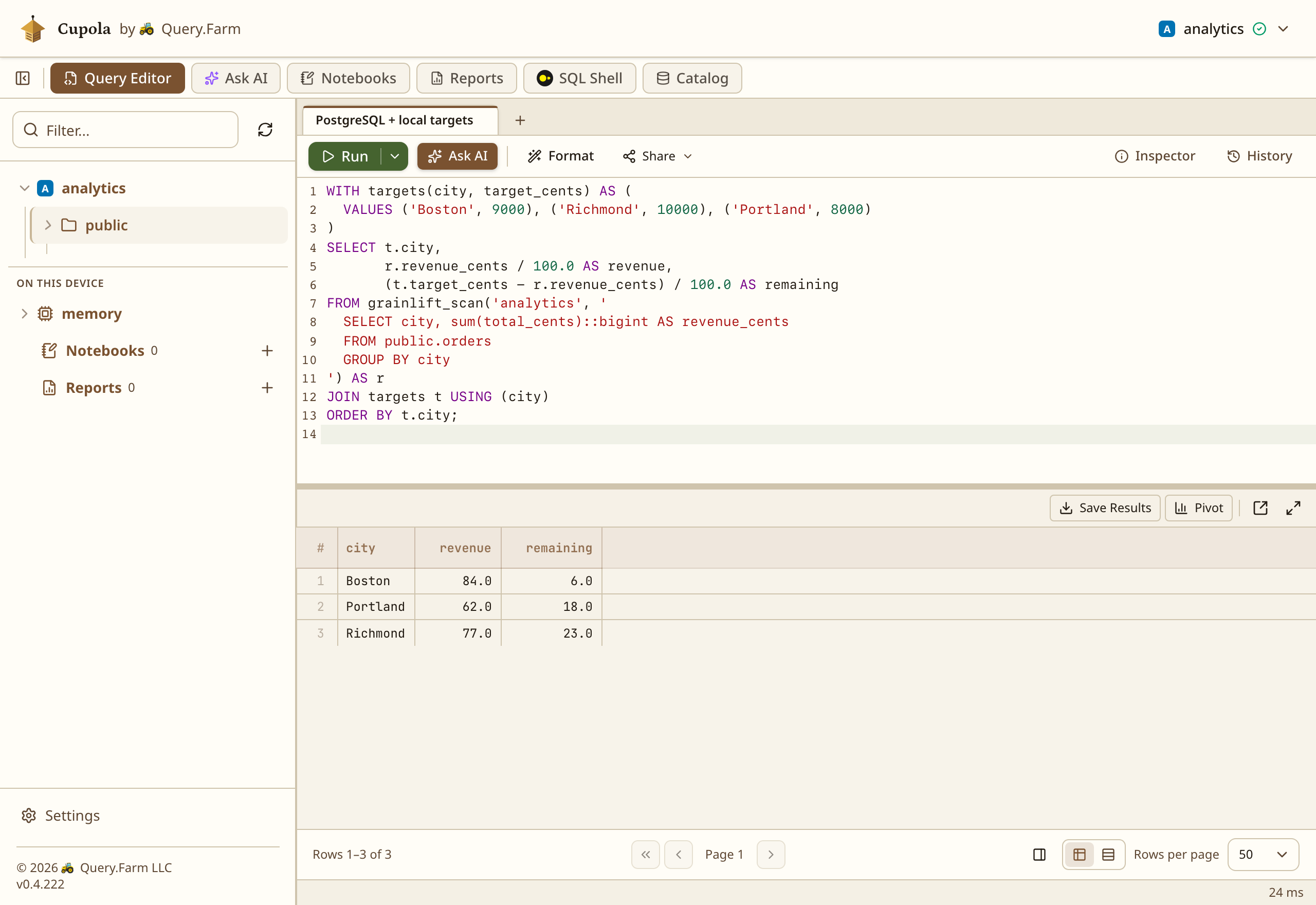
PostgreSQL returns one row per city. Those rows can take part in another Haybarn query. For example, join them to a small set of sales targets supplied in the browser:
SELECT city, sum(total_cents)::bigint AS revenue_cents
FROM public.orders
GROUP BY city
') AS r
JOIN targets t USING (city)
ORDER BYt.city;
A CSV loaded into Haybarn could supply the targets instead. PostgreSQL handles the orders aggregation, and Haybarn performs the join. You can choose how much data crosses the connection and which engine does each part of the work.
A PostgreSQL aggregation joined to local sales targets in Cupola, using sample orders. View full size.
Use another ADBC driver
The PostgreSQL setup shows the division of work. The gateway chooses the driver and supplies its database connection options. The browser chooses an authorized target and uses ADBC operations through Grainlift.
To expose another database, install its ADBC driver and configure another target with that driver’s entry point and options. The browser keeps the same Grainlift client. The ADBC driver catalog lists the available drivers and their setup requirements.
The common interface does not make all databases behave identically. SQL passed through grainlift_scan follows the selected database’s dialect. Type mappings and operations such as transactions or bulk ingestion depend on the downstream driver. Grainlift preserves those capabilities and limitations.
The same gateway can also serve native clients. Python can load the Grainlift ADBC driver, and native Haybarn or DuckDB can load it through adbc_scanner. The earlier article has terminal and Python examples. The native client loads a shared library; the browser uses the Grainlift driver compiled into its extension.
Grainlift adds a service to operate, and requests still pay for network round trips. The gateway owns live connections and result cursors, so sessions must keep reaching the process that owns them. Database permissions continue to matter: a client can do what its target’s configured database account allows.
For a browser application that needs several databases, the benefit is avoiding a separate browser implementation for each driver. Keep the native drivers where they work, and use Grainlift to make their ADBC interface available to the browser.

 dbc, the ADBC driver package manager:
 uv:
uv: